How to Access Webmail
CyclebreezeHost provides Roundcube webmail so you can read, compose, and manage your email directly in a browser — no mail client required. This is useful when you're away from your usual device or need to check email quickly without any configuration.
Before You Begin
You need an active email account on your hosting plan. You can create or manage email accounts by logging in to cPanel and navigating to Email Accounts. Once an account exists, webmail access is available immediately.
Accessing Webmail
There are two ways to reach the webmail login screen.
Option 1 — Direct URL
- Open a browser and go to
https://mail.yourdomain.com(replaceyourdomain.comwith your actual domain). - You will be redirected to the cPanel webmail login page.
- Enter your full email address (e.g.,
info@yourdomain.com) as the username. - Enter the password you set when creating the email account.
- Click Log In.
Option 2 — Via cPanel
- Log in to cPanel at
https://yourdomain.com:2083. - Click Email Accounts under the Email section.
- Find the mailbox you want to open and click Check Email.
- cPanel will log you in to webmail automatically.
Choosing the Roundcube Interface
When you first log in through the direct URL, you may be prompted to choose a webmail application. Select Roundcube for the best experience. You can tick Set as default to skip this prompt in future.
Using Roundcube
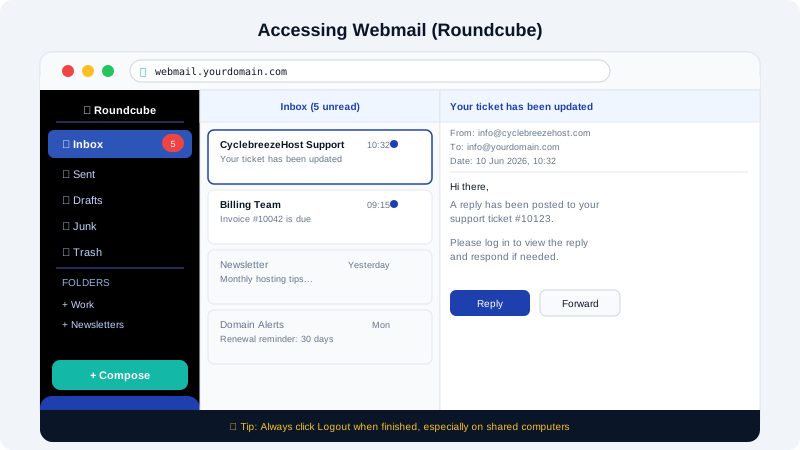
Once logged in, Roundcube works like most email clients:
- Inbox — All incoming messages appear here.
- Compose — Click Compose to write a new message.
- Folders — Sent, Drafts, Junk, and Trash are in the left sidebar. You can create custom folders by right-clicking the folder list.
- Settings — Click the gear icon at the top right to adjust your display name, signature, and auto-reply settings.
Logging Out
Always click Logout in the top-right corner when you're finished, especially on a shared or public computer. Closing the browser tab does not end your session.
Changing Your Webmail Password
You cannot change your email password from within Roundcube. To update your password:
- Log in to cPanel.
- Go to Email Accounts.
- Click Manage next to the account.
- Enter and confirm a new password, then click Update Email Settings.
The new password takes effect immediately for both webmail and any connected mail clients.
Troubleshooting
| Problem | Solution |
|---|---|
| "Invalid credentials" error | Double-check you're using the full email address, not just the username part |
| Page not loading | Try https://yourdomain.com/webmail as an alternative URL |
| Email not arriving | Check your Junk folder; SpamAssassin may have filtered it |
| Session keeps expiring | This is a security timeout — log in again; avoid checking "remember me" on public devices |
If you continue to have trouble accessing webmail, open a support ticket at https://clients.cyclebreezehost.com or email info@cyclebreezehost.com. Our team is available 24/7.