Addon Domains vs Subdomains vs Parked Domains
cPanel gives you three ways to host additional web content beyond your primary domain: addon domains, subdomains, and parked domains. Each serves a different purpose, and choosing the right one depends on what you are trying to achieve. This article explains how each option works so you can make the right decision.
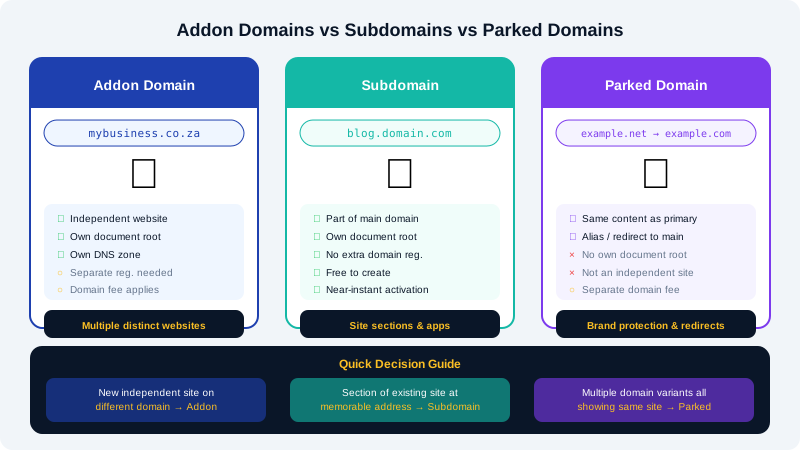
Addon Domains
An addon domain is a fully independent website hosted inside your existing cPanel account. It has its own document root (a separate folder in your file system), its own DNS zone, and appears to visitors as a completely separate site. For example, if your primary domain is example.com, you could add mybusiness.com as an addon domain and host an entirely different website there.
Best for: Running multiple distinct websites under one hosting account.
How to add an addon domain in cPanel
- Log in to cPanel.
- Under the Domains section, click Domains (or Addon Domains in older versions of cPanel).
- Enter the domain name you want to add.
- cPanel will suggest a document root folder (e.g.,
/public_html/mybusiness.com) — you can customise this. - Click Add Domain.
- Update the domain's nameservers or DNS
Arecord to point to your hosting server IP so traffic is routed correctly.
Note: The domain must already be registered before you can add it to cPanel. Register it in the Client Area at https://clients.cyclebreezehost.com or transfer it there.
Subdomains
A subdomain is a prefix attached to your existing domain, separated by a dot — for example, shop.example.com or blog.example.com. It is part of your primary domain and does not require a separate domain registration. Each subdomain gets its own document root and can host different content or applications.
Best for: Sections of your main site that benefit from a distinct address, such as a blog, online store, staging environment, or client portal.
How to create a subdomain in cPanel
- Log in to cPanel.
- Under Domains, click Subdomains.
- Enter the prefix (e.g.,
shop) and select the parent domain from the drop-down. - cPanel automatically suggests a document root (e.g.,
/public_html/shop). - Click Create.
The subdomain is active almost immediately — no DNS propagation delay because cPanel creates the record in your zone automatically.
Parked Domains (Domain Aliases)
A parked domain (called a Domain Alias in newer cPanel versions) is a domain that points to exactly the same content as your primary domain. Visitors who go to example.net or example.com see the same site as example.com. There is no separate document root — both domains serve identical content from the same folder.
Best for: Protecting your brand by registering multiple TLD variations and directing them all to your main site, or consolidating legacy domain names.
How to add a parked domain in cPanel
- Log in to cPanel.
- Under Domains, click Aliases (or Parked Domains in older versions).
- Enter the domain name you want to park.
- Click Add Domain.
- Point the domain's nameservers or DNS
Arecord to your hosting server.
Quick Comparison
| Feature | Addon Domain | Subdomain | Parked Domain |
|---|---|---|---|
| Separate registration needed | Yes | No | Yes |
| Independent website content | Yes | Yes | No (mirrors primary) |
| Own document root | Yes | Yes | No |
| Extra cost | Domain fee | Free | Domain fee |
| Typical use | Multiple sites | Site sections / apps | Brand protection / redirects |
Which Should You Choose?
- You want a brand-new independent website on a different domain → use an addon domain.
- You want a section of your existing site at a memorable address → use a subdomain.
- You own multiple domain variations and want them all to show the same site → use a parked domain.
If you need help deciding or encounter any issues adding domains to your account, contact CyclebreezeHost support at info@cyclebreezehost.com or open a ticket in the Client Area.