Applying Promo Codes and Account Credit
CyclebreezeHost occasionally offers promotional codes that give you a discount on new services or renewals. In addition, account credit (earned through referrals, goodwill adjustments, or refunds) can be applied toward any invoice. This article explains how to use both.
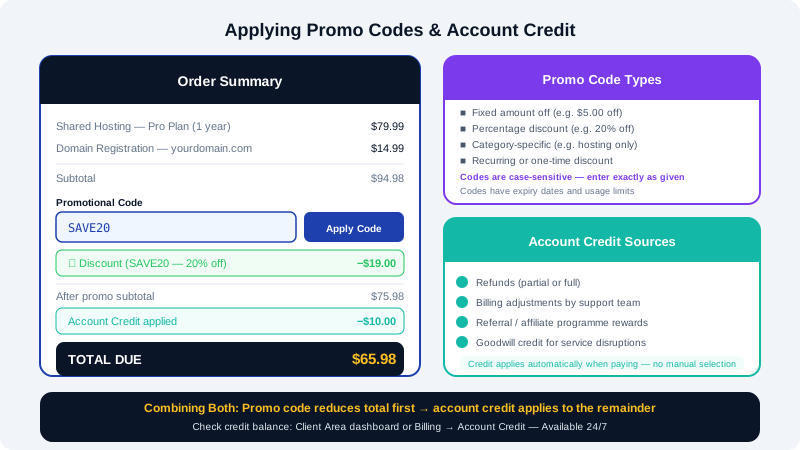
Promotional Codes
A promo code (also called a coupon or discount code) is a string of characters that applies a discount when entered during checkout. Discounts may be:
- A fixed amount off the order total (e.g., $5.00 off)
- A percentage off the order total (e.g., 20% off)
- A discount on a specific product category (e.g., shared hosting only)
- A one-time discount or a recurring reduction for a set number of billing cycles
Promo codes have an expiry date and may be limited to new services, specific plans, or a maximum number of uses. Always check the terms attached to the code before applying it.
How to apply a promo code at checkout
- Add the product or service you want to purchase to your order in the Client Area at https://clients.cyclebreezehost.com or via the CyclebreezeHost website.
- On the order review or checkout page, look for the Promotional Code or Coupon Code field.
- Enter your code exactly as provided — codes are case-sensitive.
- Click Validate Code or Apply.
- If the code is valid and applicable to your order, the discount will appear in the order summary before you complete payment.
- Proceed to payment as normal.
Note: If the promo code field does not appear, the product may not be eligible for discounts, or your cart may not yet have an applicable item. Ensure you are purchasing a qualifying product.
Troubleshooting promo codes
| Issue | Likely cause |
|---|---|
| "Invalid code" error | Code is misspelled, expired, or has already reached its usage limit |
| Discount not applied | Product may be excluded from the promotion |
| Code accepted but no discount shown | Code may apply to the first renewal rather than the initial order |
If you believe your code should work but is being rejected, contact CyclebreezeHost support at info@cyclebreezehost.com with the code and details of what you are trying to purchase.
Account Credit
Account credit is a positive balance held in your CyclebreezeHost Client Area that can be used to pay invoices. Credit may be added to your account when:
- You receive a partial or full refund
- A billing adjustment is made in your favour by the support team
- You earn a referral reward through the CyclebreezeHost affiliate or referral programme
- CyclebreezeHost issues a goodwill credit for a verified service disruption
Checking your account credit balance
- Log in to the Client Area.
- Your current credit balance is displayed on the Dashboard summary, or you can go to Billing > Account Credit for a detailed view.
How account credit is applied
Account credit is applied automatically when you pay an invoice. If your credit balance is equal to or greater than the invoice amount, the invoice is marked as paid with no additional charge. If the invoice is larger than your credit balance, only the credit portion is covered and you pay the remainder through your normal payment method.
You do not need to manually select "use credit" — the Client Area applies it by default when you click Pay Now on an invoice.
Requesting a manual credit application
In some cases (for example, if auto-pay ran before credit was added), credit may not have been applied to a specific invoice. If you believe credit should have been used:
- Open a support ticket in the Client Area.
- Include the invoice number and the credit transaction reference.
- The billing team will review and adjust if applicable.
Combining Promo Codes and Account Credit
You can use a promo code and account credit together on the same order. The promo code reduces the order total first, and then any available account credit is applied to the remaining balance.
For any billing-related questions, contact CyclebreezeHost support at info@cyclebreezehost.com or open a ticket in the Client Area — our team is available 24/7.