Billing Your Clients as a Reseller
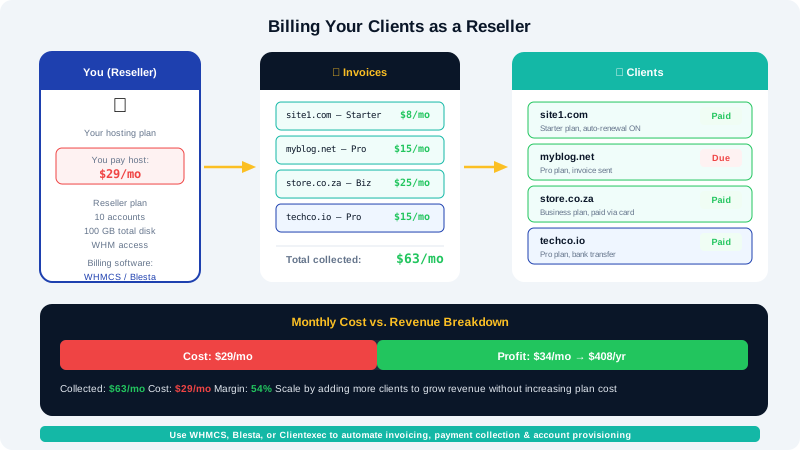
CyclebreezeHost handles billing between you and CyclebreezeHost — but billing your own clients is entirely your responsibility. As a reseller, you set your own prices, issue your own invoices, and choose your own payment methods. This article covers the tools, strategies, and best practices for running the financial side of your hosting business.
Your Billing Relationship
It is important to understand the two separate billing relationships at play:
| Relationship | Who Invoices Who | Platform |
|---|---|---|
| CyclebreezeHost → You | CyclebreezeHost bills you for your reseller plan | CyclebreezeHost Client Area |
| You → Your clients | You bill your clients for the hosting you provide | Your own billing system |
CyclebreezeHost has no visibility into what you charge your clients or how you bill them. You keep the difference between what CyclebreezeHost charges you and what you charge your clients.
Recommended Billing Platform: WHMCS
Most professional resellers use WHMCS (Web Host Manager Complete Solution) as their client-facing billing and support platform. WHMCS automates:
- Recurring invoices and payment reminders
- Automated account creation and suspension on payment events
- A client portal where customers can manage their services, submit tickets, and pay invoices
- Domain registration and renewal billing
- Integration with popular payment gateways (PayPal, Stripe, Payfast, Peach Payments, and more)
You install and run your own WHMCS instance on a separate domain or subdomain (e.g., clients.yourbrand.com). WHMCS licences are available directly from whmcs.com.
Alternative Billing Tools
If WHMCS is outside your budget when starting out, there are simpler alternatives:
| Tool | Best For | Notes |
|---|---|---|
| WHMCS | Professional resellers | Full automation, steep learning curve |
| Blesta | Mid-size operations | Cheaper licence, modern UI |
| FOSSBilling | Budget/startups | Open-source, free |
| Wave / Zoho Invoice | Very small operations | Manual invoicing, no hosting integration |
| PayPal Invoicing | Minimal setup | No automation; not ideal at scale |
Setting Your Prices
When pricing your hosting plans, account for:
- Your cost from CyclebreezeHost — Divide your reseller plan cost by the number of clients you plan to host to estimate your per-client cost.
- Overhead — WHMCS licence, your domain, SSL, support time.
- Market rates — Research what comparable plans cost in your target market.
- Profit margin — A 30–60% margin is typical for small resellers.
For example: if your CyclebreezeHost reseller plan costs $30/month and you can host 20 clients on it, your base cost per client is $1.50/month. Charging $6–10/month per client yields a healthy margin.
Payment Collection Best Practices
Accept multiple payment methods. Clients in Africa and other emerging markets often prefer mobile money, local bank transfer, or regional gateways. Offering PayPal, Stripe, and at least one local gateway increases conversion.
Require payment upfront. Charge monthly or annually in advance. Hosting infrastructure is provisioned before the client can use it, so you bear the cost upfront.
Automate suspension. Configure your billing system to automatically suspend accounts a set number of days after an invoice becomes overdue (typically 3–7 days). This reduces unpaid debt and encourages timely payment.
Use annual discounts. Offer one or two months free for annual payment. This improves your cash flow and reduces churn.
Managing Non-Payment
When a client does not pay:
- Your billing system sends automated reminder emails before and after the due date.
- After the grace period, trigger a suspension in WHM manually or via your billing system's WHM integration.
- If non-payment continues, terminate the account after a reasonable notice period (typically 30 days).
- Keep records of all communications in case of disputes.
Handling Refunds and Disputes
Define a clear refund policy on your website before you launch. A common approach:
- Money-back guarantee for the first 14 or 30 days for new accounts.
- No refunds for renewals or partial months.
- Disputes over suspended accounts are handled via your support ticket system.
Staying Compliant
Depending on your location, you may need to:
- Register your business with the relevant authority.
- Charge VAT or sales tax on invoices (WHMCS can handle this automatically).
- Issue tax-compliant invoices with your VAT number.
- Comply with POPIA (South Africa), GDPR (EU), NDPR (Nigeria), or equivalent regulations in your market.
Consult a local accountant or legal adviser for guidance on your specific jurisdiction.
Managing Your CyclebreezeHost Account
Your own hosting costs are managed separately through the CyclebreezeHost Client Area at https://clients.cyclebreezehost.com. Log in there to pay your reseller plan invoices, view your plan details, and open support tickets. Keeping your CyclebreezeHost account in good standing is essential — if your reseller plan is suspended for non-payment, all of your clients' sites will go offline.
For technical support or questions about your reseller plan, contact CyclebreezeHost 24/7 at info@cyclebreezehost.com.