Changing Domain Ownership (Registrant Transfer)
A registrant transfer (also called a change of ownership) updates the legal owner of a domain. This is different from a registrar transfer (moving to a new registrar). You may need to change ownership when selling a domain, restructuring a business, or correcting incorrect registrant details. This guide covers both updating registrant contact details and transferring a domain to a different CyclebreezeHost account.
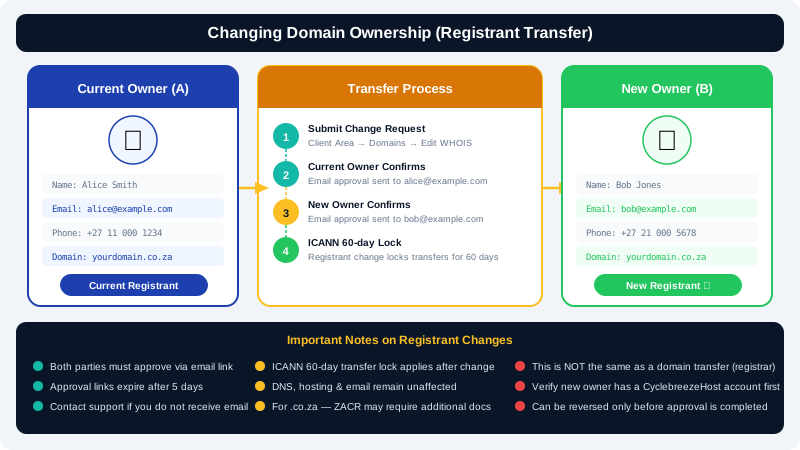
Understanding the Two Types of Changes
| Change | What It Does |
|---|---|
| Contact update | Corrects or updates name, email, address, phone on an existing registration |
| Registrant transfer | Changes the legal owner; may trigger a 60-day transfer lock (ICANN policy for gTLDs) |
For minor corrections (e.g. fixing a typo in the registrant name), a contact update is sufficient. For a full change of ownership, a registrant transfer is required.
Updating Registrant Contact Details
- Log in to the Client Area at https://clients.cyclebreezehost.com.
- Click Domains and select the domain you want to update.
- In the domain management panel, click Contacts / Nameservers.
- Under the Registrant contact, update the relevant fields (name, email, address, phone).
- Click Save Changes.
For gTLDs such as
.com,.net, and.org, changing the registrant email address is treated by ICANN as a change of ownership. An email verification or approval may be sent to both the old and new email addresses.
Transferring a Domain Between CyclebreezeHost Accounts
If you are moving a domain from one CyclebreezeHost client account to another (for example, when a client takes over their own domain):
- Recipient creates a CyclebreezeHost account at https://clients.cyclebreezehost.com if they do not already have one.
- Current owner logs in to the Client Area and opens a support ticket requesting an inter-account domain push.
- Provide in the ticket:
- Domain name
- Recipient's CyclebreezeHost account email address
- Confirmation that both parties consent to the transfer
- The CyclebreezeHost team will process the push. The domain will appear in the recipient's account within 1 business day.
Changing Ownership for .co.za and ZA Domains
For South African domains, ZACR has its own registrant change process. A registrant change request is submitted through the registry and requires:
- Written consent from both the current registrant and the new registrant
- Accurate contact details for the incoming registrant
Contact CyclebreezeHost support at info@cyclebreezehost.com to initiate a ZA domain registrant change. The team will guide you through the required steps and documentation.
ICANN 60-Day Transfer Lock
When the registrant email or name is changed on a gTLD domain, ICANN policy may impose a 60-day lock that prevents the domain from being transferred to another registrar. This does not affect your website or DNS — only outgoing registrar transfers are blocked during this period.
If you need to transfer to another registrar immediately after a registrant change, contact CyclebreezeHost support to discuss your options.
Selling a Domain
If you are selling a domain to a third party:
- Agree on the sale terms with the buyer.
- Request an inter-account domain push (if they have or create a CyclebreezeHost account), or follow the standard transfer-away process if they use a different registrar.
- Ensure the buyer confirms receipt of the domain before releasing any funds.
CyclebreezeHost does not act as an escrow service — use a reputable domain escrow service for high-value transactions.
Protecting Your Domain from Unauthorised Transfers
- Keep the Registrar Lock enabled at all times when not actively transferring.
- Use a secure email address for your CyclebreezeHost account and enable two-factor authentication in the Client Area.
- Review registrant details periodically to ensure they are accurate and up to date.
Need Help?
Contact the CyclebreezeHost support team at info@cyclebreezehost.com or open a ticket in the Client Area — we are available 24/7.