Checking Service and Network Status
Before raising a support ticket for a service that seems unavailable, it is worth checking whether there is a known outage or scheduled maintenance window already in progress. CyclebreezeHost publishes real-time and historical status information so you can quickly determine whether an issue is on our side or isolated to your account or device.
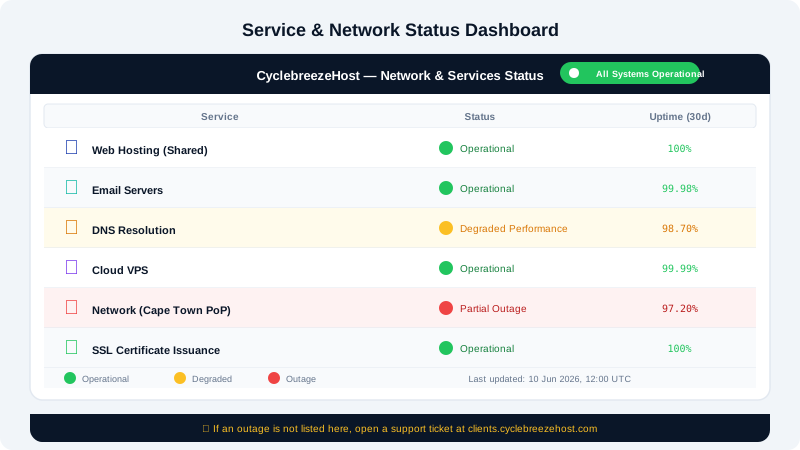
The Network Status Page
Visit the CyclebreezeHost Network Status page at:
https://www.cyclebreezehost.com/network-status
This page provides:
- Current status of core infrastructure components (web servers, DNS, mail servers, control panels)
- Active incidents with a description, start time, and ongoing updates from our operations team
- Scheduled maintenance windows with planned start and end times
- Historical incidents for the past 90 days
If you see a red or yellow status indicator next to the service you are experiencing trouble with, an incident is already logged and our team is working on it. You do not need to open a separate support ticket for a known outage — we will post updates as work progresses.
Understanding Status Indicators
| Indicator | Meaning |
|---|---|
| Operational | The service is running normally with no detected issues |
| Degraded Performance | The service is available but running slower than normal |
| Partial Outage | Some users or regions are affected |
| Major Outage | Widespread disruption — our team is actively working on a fix |
| Maintenance | A scheduled maintenance window is in progress |
Checking From Your Device
If the status page shows everything is operational but your site or email is not working, the issue may be specific to your account, device, or network. Try these steps before contacting support:
- Try a different browser or device — rules out a local browser cache or extension conflict.
- Check your internet connection — visit a different website to confirm your connection is working.
- Flush your DNS cache — run
ipconfig /flushdnson Windows orsudo dscacheutil -flushcacheon macOS to clear stale DNS entries. - Use an online checker — tools such as
downforeveryoneorjustme.comcan confirm whether your domain is reachable from outside your network. - Check for recent changes — if you recently changed DNS records, installed a plugin, or edited configuration files, that may be the cause.
Planned Maintenance Notifications
For significant maintenance windows, CyclebreezeHost sends advance email notifications to affected customers. Ensure your contact email address in the Client Area is current to receive these notices:
- Log in at https://clients.cyclebreezehost.com.
- Click your name in the top right → Edit Account Details.
- Verify your email address is correct and up to date.
Reporting an Issue Not Listed on the Status Page
If you are experiencing a problem that is not reflected on the status page, please report it:
- Log in to the Client Area at https://clients.cyclebreezehost.com.
- Open a Technical Support ticket and describe what you are experiencing, including:
- Your domain name
- The affected service (website, email, cPanel)
- The time the issue started
- Any error messages you see
- Our team will investigate and, if it is a wider infrastructure issue, update the status page accordingly.
You can also email info@cyclebreezehost.com for urgent matters. Our team monitors all incoming requests around the clock.