Choosing the Right Hosting Plan
CyclebreezeHost offers several types of hosting, each designed for a different scale of project and technical requirement. Picking the right plan from the start saves you the effort of migrating later and ensures your site runs at the right performance level for the right price. This guide explains the key differences and helps you match your needs to the right plan.
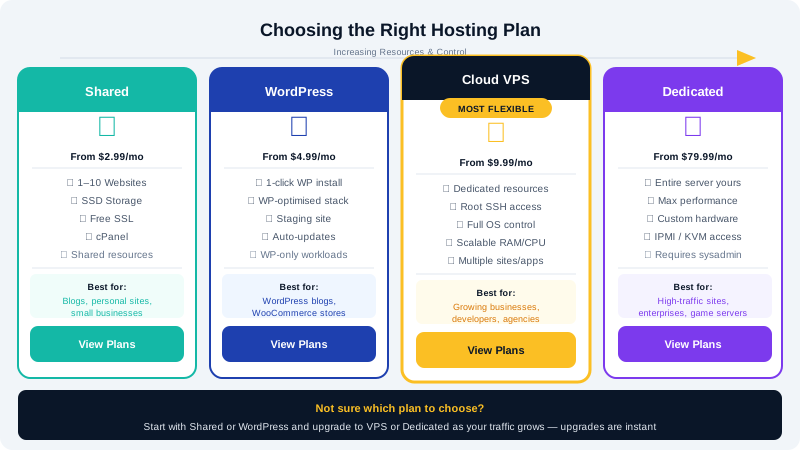
At a Glance
| Plan Type | Best For | Technical Skill Required | Resources |
|---|---|---|---|
| Shared Hosting | Blogs, brochure sites, small business sites | None | Shared pool |
| WordPress Hosting | WordPress sites needing speed optimisation | None | Shared, WP-optimised |
| Cloud VPS | Growing sites, agencies, custom applications | Moderate | Dedicated allocation |
| Dedicated Server | High-traffic sites, enterprise applications | Advanced | Entire server |
Shared Hosting
Shared hosting is the most affordable option and the right starting point for the vast majority of new websites. Your site shares server resources with other accounts, which is perfectly adequate when your traffic is modest and your site does not run CPU-intensive processes.
Choose shared hosting if:
- You are launching a personal blog, portfolio, or small business website.
- You expect fewer than 10,000 monthly visitors.
- You want a managed environment where the server is fully maintained by CyclebreezeHost.
- You need email hosting alongside your website.
What is included:
- cPanel control panel
- LiteSpeed web server with LiteSpeed Cache support
- Free Let's Encrypt SSL (AutoSSL)
- Softaculous one-click installer (WordPress, Joomla, etc.)
- JetBackup automated backups
- Imunify360 security
WordPress Hosting
CyclebreezeHost's WordPress hosting plans are tuned specifically for WordPress performance. They run on the same LiteSpeed infrastructure as shared hosting but with configurations optimised for WordPress workloads — making them faster for WordPress sites than a generic shared account.
Choose WordPress hosting if:
- You are running one or more WordPress sites.
- Site speed and Core Web Vitals scores matter to your business.
- You want pre-configured caching without manual setup.
The practical difference from shared hosting is the server-level WordPress optimisation and, depending on the plan, a higher resource allowance for WordPress-specific processes.
Cloud VPS Hosting
A Cloud VPS gives you a virtualized server with a guaranteed, dedicated allocation of CPU cores and RAM that is never shared with other users. You get root access, full control over your software stack, and significantly more processing power than shared hosting.
Choose a VPS if:
- Your site has outgrown shared hosting (high traffic, frequent timeouts, or resource limit notifications in cPanel).
- You run a WooCommerce store with a large catalogue or high order volume.
- You need to install custom server software or run background processes.
- You manage multiple client websites and need isolated environments.
- You are a developer who needs full control over the server environment.
What to expect: VPS plans require more technical confidence. You will manage your own server software updates, security hardening, and configuration — unless you opt for a managed VPS, in which case CyclebreezeHost handles the underlying server maintenance.
Dedicated Servers
A dedicated server is an entire physical machine reserved exclusively for your use. There is no virtualisation layer and no neighbouring accounts — every CPU core, every gigabyte of RAM, and every disk read/write operation is yours.
Choose a dedicated server if:
- You run a high-traffic website (hundreds of thousands of monthly visits).
- You need maximum, consistent performance with no "noisy neighbour" effect.
- You have strict data isolation requirements for compliance or security.
- You are running a SaaS product, game server, or streaming service.
Upgrading Your Plan
You are never locked in. If your site outgrows its current plan, you can upgrade directly from your Client Area:
- Go to Services > My Services.
- Click your current hosting package.
- Select Upgrade/Downgrade and choose your new plan.
Your files, databases, and email accounts are preserved during the upgrade. For migrations between different server types (e.g., shared to VPS), our team handles the transfer.
Still Unsure?
If you are not certain which plan fits your project, open a pre-sales support ticket at clients.cyclebreezehost.com or email info@cyclebreezehost.com. Our team is available 24/7 and will give you an honest recommendation based on your specific needs.