How to Create Email Forwarders
An email forwarder automatically copies every incoming message from one address to another. This is useful when you want mail sent to info@yourdomain.com to also arrive in a personal Gmail inbox, or when you need a catch-all address that routes everything to a single mailbox.
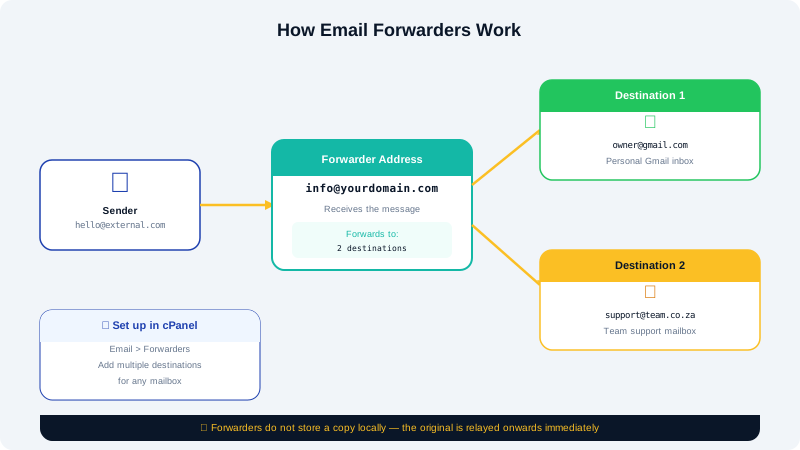
Creating a Forwarder in cPanel
- Log in to cPanel at
https://yourdomain.com:2083. - Under the Email section, click Forwarders.
- Click Add Forwarder.
- In the Address to Forward field, enter the local part of the address — for example, type
infoforinfo@yourdomain.com. Select the correct domain from the dropdown if you have more than one. - Under Destination, choose one of the following options:
- Forward to Email Address — enter the target address (e.g., your personal Gmail).
- Discard and send an error to the sender — silently rejects mail (use sparingly).
- Pipe to a Program — advanced option for routing mail to a script.
- Click Add Forwarder to save.
Mail arriving at the source address will now be copied to the destination automatically.
Creating a Domain-Level Catch-All Forwarder
A catch-all forwarder routes any message sent to an address that does not exist on your domain to a specified mailbox. This prevents legitimate mail from bouncing when someone miskeys an address.
- In cPanel, go to Email → Forwarders.
- Click the Email Account Forwarders tab, then click Add Domain Forwarder.
- Select the domain and enter the address that should receive unmatched mail.
- Click Add Domain Forwarder.
Use catch-all addresses with care — they can attract large volumes of spam sent to random addresses on your domain.
Viewing and Deleting Forwarders
- Go to Email → Forwarders in cPanel.
- The table lists all active forwarders for each domain.
- Click Delete next to a forwarder to remove it. Deletion takes effect immediately.
Forwarding vs. Keeping a Copy
By default, cPanel forwarders do not keep a copy in the original mailbox — the message is only delivered to the forwarding destination. If you want to receive mail in both places, you have two options:
- Create a second forwarder pointing to the same mailbox — for example, forward
info@yourdomain.comtoinfo@yourdomain.com(the local mailbox) and also toyou@gmail.com. - Alternatively, set up the external mail client (Gmail, Outlook) to fetch mail via IMAP or POP3, which always leaves a copy on the server.
Troubleshooting
| Problem | Solution |
|---|---|
| Forwarded mail going to spam | The destination provider may flag forwarded mail; adding SPF and DKIM records to your domain helps |
| Forwarder not delivering | Confirm the destination address is correct and the target inbox is not full |
| Loop warning in cPanel | You are forwarding to an address that forwards back — check the destination chain |
| Catch-all inbox overflowing with spam | Remove the catch-all or set the destination to a dedicated filtering address |
For help with forwarders or email routing, open a support ticket at https://clients.cyclebreezehost.com or email info@cyclebreezehost.com. Our team is available 24/7.