Creating Strong Passwords
A weak password is one of the most common ways hosting accounts, domains, and websites get compromised. Creating strong, unique passwords for every account you use is the single most effective security habit you can adopt. This guide explains what makes a password strong and how to manage passwords without relying on memory.
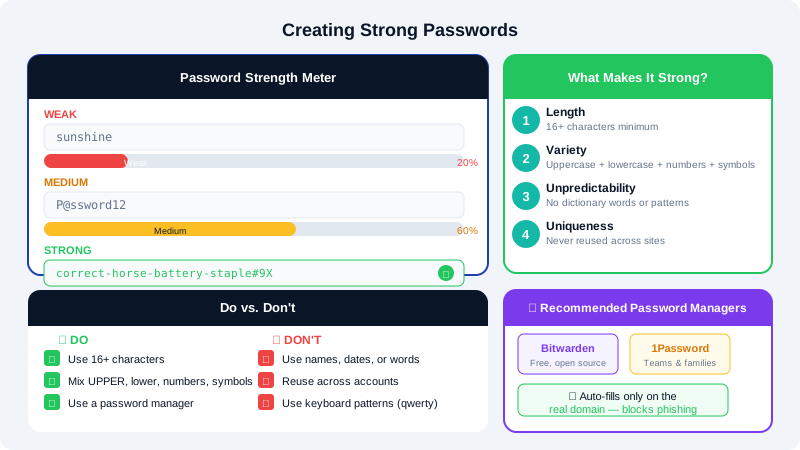
What Makes a Password Strong
A strong password is difficult for automated tools to guess or crack. The key properties are:
- Length — at least 16 characters. Length matters more than complexity alone.
- Variety — a mix of uppercase letters, lowercase letters, numbers, and symbols.
- Unpredictability — no dictionary words, names, dates, or keyboard patterns like
qwertyor123456. - Uniqueness — never reused across different accounts or services.
Avoid these common weak choices:
| Weak Pattern | Example | Why It Fails |
|---|---|---|
| Dictionary word | sunshine | Cracked instantly by dictionary attack |
| Personal info | john1985 | Guessable from social media |
| Simple substitutions | p@ssw0rd | Included in every cracking wordlist |
| Short passwords | Abc$1 | Brute-forced in seconds |
| Reused passwords | Same for email and hosting | One breach exposes everything |
Generating a Strong Password
You do not need to invent strong passwords yourself. Use one of these methods:
Method 1 — cPanel Password Generator:
- In cPanel, any password field includes a Password Generator button.
- Click it to generate a random, high-strength password.
- Copy and save it to your password manager before clicking Use Password.
Method 2 — Password Manager Generator: Most password managers (see below) include a built-in generator. Set it to at least 16 characters with all character types enabled.
Method 3 — Passphrase:
A passphrase is four or more random, unrelated words joined together, such as correct-horse-battery-staple. Passphrases are long, memorable, and resistant to cracking. Add a number or symbol to meet any complexity requirements.
Using a Password Manager
A password manager stores all your passwords in an encrypted vault so you only need to remember one master password. This makes it practical to use a unique, strong password for every account.
Popular options include Bitwarden (free, open source), 1Password, and KeePass. All allow you to:
- Generate and save strong passwords automatically
- Auto-fill login forms in your browser
- Store secure notes, such as server credentials
- Sync across devices
Set a strong, memorable master password for your password manager — this is the one password you must remember.
Passwords for Specific CyclebreezeHost Accounts
| Account | Where to Change | Recommendation |
|---|---|---|
| CyclebreezeHost Client Area | https://clients.cyclebreezehost.com > Profile | 20+ chars, unique |
| cPanel | Client Area > Hosting > Change Password | Generated, stored in manager |
| FTP accounts | cPanel > FTP Accounts | Unique per FTP user |
| Email accounts | cPanel > Email Accounts | Unique per mailbox |
| Database users | cPanel > MySQL Databases | Random, 24+ chars |
| CMS admin (WordPress etc.) | CMS dashboard > user profile | 20+ chars, unique |
Enabling Two-Factor Authentication
A strong password alone is not enough if it is ever exposed in a data breach. Enable two-factor authentication (2FA) wherever possible as a second layer of protection:
- In your CyclebreezeHost Client Area, go to Security Settings and enable Two-Factor Authentication.
- In cPanel, go to Security > Two-Factor Authentication and link an authenticator app.
- In your CMS, install a 2FA plugin (e.g., WP 2FA for WordPress).
With 2FA enabled, an attacker who obtains your password still cannot log in without access to your authentication device.
What to Do If You Suspect a Compromise
If you believe a password has been exposed:
- Change the affected password immediately.
- Change the same password on any other account where you reused it.
- Review your account for unauthorised changes.
- Enable 2FA if you have not already done so.
- Contact CyclebreezeHost support at info@cyclebreezehost.com if you suspect your hosting account has been accessed without your permission.