How to Enable DNSSEC
DNSSEC (Domain Name System Security Extensions) adds a layer of cryptographic verification to your domain's DNS records. It prevents attackers from redirecting your visitors to fraudulent sites through DNS cache poisoning or spoofing attacks. This guide explains how to enable DNSSEC for domains registered and hosted with CyclebreezeHost.
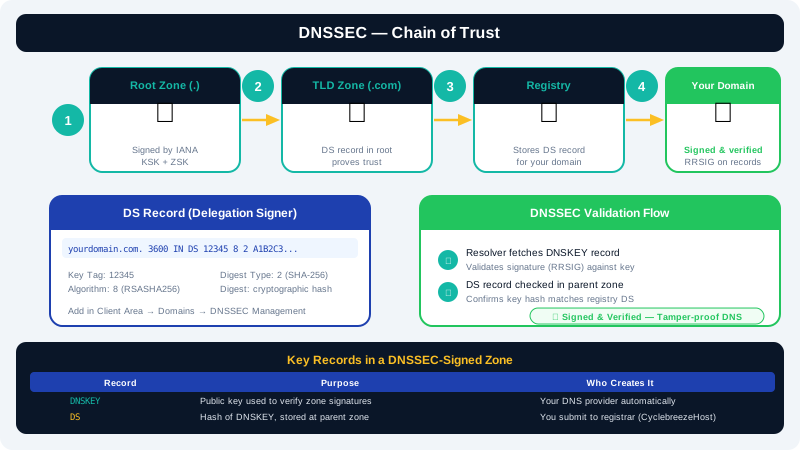
What DNSSEC Does
Without DNSSEC, a resolver that receives a forged DNS response has no way to detect it. DNSSEC addresses this by digitally signing DNS zone data. Resolvers that support DNSSEC validation can verify these signatures and reject tampered responses.
Enabling DNSSEC involves two steps:
- Generating a signed zone — your DNS server creates cryptographic keys and signs the zone records.
- Publishing DS records at the registry — you upload a Delegation Signer (DS) record to your registrar so the parent zone can verify your zone's keys.
Both steps are required for DNSSEC to be fully effective.
Prerequisites
- Your domain must be registered with CyclebreezeHost (DNSSEC DS records are submitted to the registry via your registrar).
- Your domain must be using CyclebreezeHost nameservers (DNSSEC only applies to the DNS zone you control).
- The TLD must support DNSSEC. Most gTLDs (
.com,.net,.org) and South African domains (.co.za) support it.
Step 1 — Enable DNSSEC Signing in cPanel
- Log in to cPanel for your hosting account.
- In the Domains section, click Zone Editor.
- Click Manage next to the domain you want to protect.
- At the top of the Zone Editor, locate the DNSSEC section or toggle and click Enable DNSSEC.
- cPanel will generate a key pair and sign your zone automatically. Once complete, it will display the DS Record details, including:
- Key Tag
- Algorithm (e.g.,
13for ECDSA P-256) - Digest Type (e.g.,
2for SHA-256) - Digest (the hex string)
Copy these values — you will need them in the next step.
Step 2 — Add the DS Record at CyclebreezeHost Registrar
- Log in to the Client Area at https://clients.cyclebreezehost.com.
- Click Domains and select the domain.
- In the domain management panel, click DNSSEC.
- Click Add DS Record and enter the values from Step 1:
- Key Tag
- Algorithm
- Digest Type
- Digest
- Click Save to submit the DS record to the registry.
The registry will publish the DS record within minutes. Full validation by resolvers worldwide may take up to 48 hours as DNS caches expire.
Verifying DNSSEC Is Active
You can verify DNSSEC validation using the following tools:
- Verisign DNSSEC Debugger:
https://dnssec-debugger.verisignlabs.com - DNSVIZ:
https://dnsviz.net
Enter your domain name and look for a green chain of trust from the root zone down to your domain. Any broken links will be highlighted with an explanation.
Disabling DNSSEC
If you need to disable DNSSEC (for example, before transferring to a registrar that does not support it):
- Remove the DS record from the Client Area DNSSEC panel first.
- Wait at least the TTL period (typically 1–2 hours) for resolvers to clear the old DS record.
- Then disable signing in cPanel Zone Editor.
Warning: Do not disable zone signing before removing the DS record. Resolvers will see a signed zone without a matching DS record and may block access to your domain.
Need Help?
Contact CyclebreezeHost support at info@cyclebreezehost.com or open a ticket in the Client Area — our team is available 24/7.