How to Find Your EPP / Auth Code
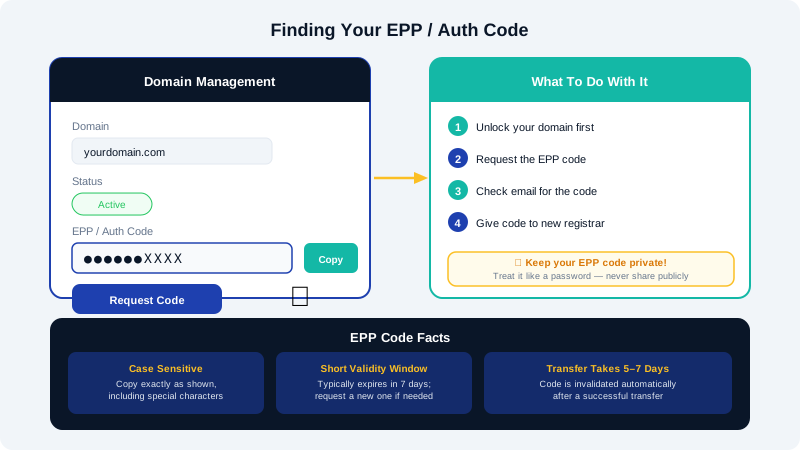
When you want to transfer a domain name away from CyclebreezeHost to another registrar, the receiving registrar will ask for an EPP code (also called an Auth Code, Authorization Code, or Transfer Key). This unique alphanumeric code acts as a password that authorises the transfer and confirms you own the domain.
What Is an EPP Code?
EPP stands for Extensible Provisioning Protocol. Every generic and country-code TLD that supports registrar-to-registrar transfers requires this code. Without it, the receiving registrar cannot initiate the transfer. The code is case-sensitive and is unique to your domain.
Before You Begin
Make sure the following conditions are met or the transfer will fail:
- The domain is unlocked (registrar lock must be off — see the article on locking and unlocking your domain).
- The domain was registered or last transferred more than 60 days ago (ICANN policy).
- There are no outstanding invoices on your CyclebreezeHost account.
- The domain is not within 30 days of its expiry date (some registries block transfers in this window).
How to Retrieve Your EPP Code
- Log in to the Client Area at https://clients.cyclebreezehost.com.
- Click Domains in the top navigation, then select My Domains.
- Find the domain you want to transfer and click its name to open the domain management page.
- On the left-hand menu, click EPP Code / Auth Code (sometimes labelled Get EPP Code or Authorization Code).
- Click the Send or Request Code button.
- Check the email address on file for your account — CyclebreezeHost will send the EPP code to the registrant contact email within a few minutes.
- Copy the code exactly as it appears, including any special characters.
Note: If you do not receive the email within 15 minutes, check your spam folder. If the registrant email address is outdated, update your contact information first and then request the code again.
Using the EPP Code at the Receiving Registrar
Paste the EPP code into the transfer form at the new registrar when prompted. The transfer process typically takes between 5 and 7 days to complete once the code is accepted. You may also receive an email asking you to approve or deny the transfer — be sure to approve it promptly or the transfer will be delayed.
EPP Code Security Tips
- Treat your EPP code like a password — do not share it publicly or include it in support tickets.
- EPP codes are typically valid for a short window (often 7 days). If yours expires before you use it, simply request a new one from the Client Area.
- After a successful transfer, the code is invalidated automatically.
Need Help?
If the EPP Code option is greyed out or unavailable, the domain may still be within the 60-day lock period, or there may be a registry-level hold in place. Contact the CyclebreezeHost support team at info@cyclebreezehost.com or open a ticket in the Client Area and we will investigate on your behalf.