Getting Started with Reseller Hosting
CyclebreezeHost Reseller Hosting gives you everything you need to launch and run your own web hosting business under your brand. Instead of managing a single site, you manage an entire server environment — creating and selling hosting accounts to your own clients, all without them ever knowing CyclebreezeHost is behind the scenes.
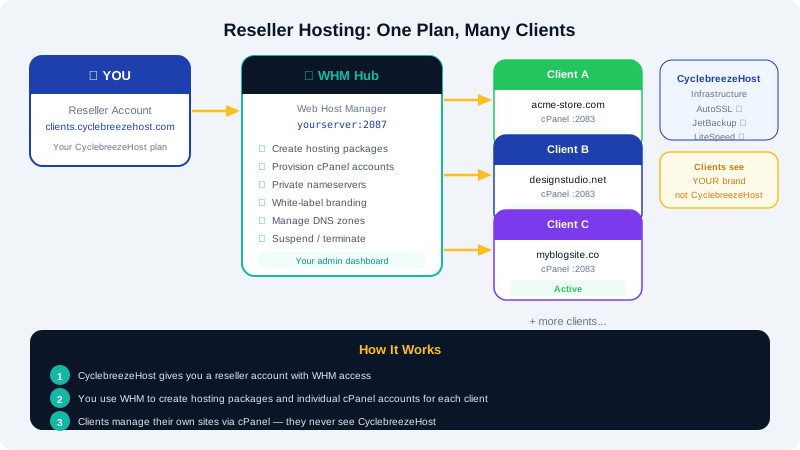
How Reseller Hosting Works
When you sign up for a reseller plan with CyclebreezeHost, you receive access to WHM (Web Host Manager) — a powerful control panel that sits above cPanel. You use WHM to create individual cPanel accounts for each of your clients. Each cPanel account is fully isolated and comes with its own disk space, bandwidth allocation, email accounts, and features.
Your clients log in to their own cPanel interface to manage their websites, email, databases, and files. They never need to interact with WHM — that is your domain as the reseller.
The Reseller Stack at a Glance
| Layer | Tool | Who Uses It |
|---|---|---|
| Server management | WHM | You (the reseller) |
| Account control | cPanel | Your clients |
| Billing & ticketing | WHMCS (optional) | You (to bill clients) |
| CyclebreezeHost billing | Client Area | You (to manage your plan) |
What You Can Do in WHM
- Create hosting packages — Define limits such as disk space, bandwidth, email accounts, and databases, then assign those packages when creating client accounts.
- Create and manage cPanel accounts — Provision new accounts in seconds, modify resource limits, suspend, or terminate accounts as needed.
- Set up private nameservers — Register nameservers like
ns1.yourbrand.comandns2.yourbrand.comso your clients see your brand, not CyclebreezeHost's. - White-label the interface — Replace WHM and cPanel branding with your own logo and company name.
- Manage DNS zones — Add, edit, or delete DNS records for any account in your reseller environment.
Accessing WHM
You can reach WHM in two ways:
- Log in to the CyclebreezeHost Client Area at
https://clients.cyclebreezehost.com. - Navigate to your reseller product and click Manage or WHM Login.
- Alternatively, go directly to
https://yourserver:2087and enter your WHM username and password.
Your WHM credentials are included in your welcome email sent at account activation.
Recommended First Steps
- Log in to WHM and change your password to something strong and unique.
- Create your first hosting package so you have a plan template ready before adding clients.
- Set up private nameservers if you want full white-label branding.
- Customise WHM and cPanel with your logo and brand colours.
- Create your first cPanel account using the package you defined.
- Set up your billing system (many resellers use their own WHMCS installation) to invoice clients automatically.
Platform Features Included
Every reseller account at CyclebreezeHost runs on cPanel/LiteSpeed infrastructure and includes:
- AutoSSL — Free SSL certificates automatically provisioned for every cPanel account you create.
- Softaculous — One-click installer for WordPress, Joomla, and 300+ other applications.
- JetBackup — Automated backups so your clients' data is protected.
Getting Help
If you run into any issues during setup, CyclebreezeHost support is available 24/7. Reach us at info@cyclebreezehost.com or open a ticket from the Client Area at https://clients.cyclebreezehost.com.