How to Cancel a Service
If you no longer need a hosting plan, domain, or other service with CyclebreezeHost, you can submit a cancellation request directly from the Client Area. This article explains the types of cancellation available, what happens to your data, and how to make sure everything is handled correctly.
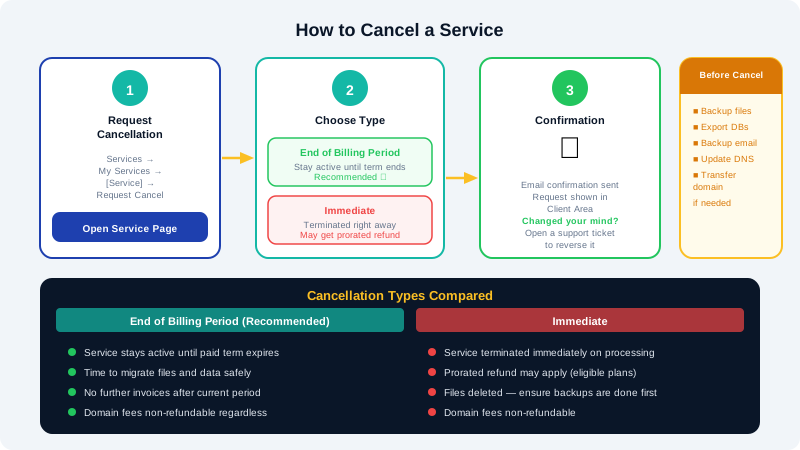
Types of Cancellation
CyclebreezeHost offers two cancellation options when you submit a request:
| Type | When it takes effect | Billing |
|---|---|---|
| End of Billing Period | Service remains active until the current paid term expires | No further invoices generated after the current period |
| Immediate | Service is terminated as soon as the request is processed | A prorated refund may apply on eligible hosting plans (domain fees are non-refundable) |
For most situations, End of Billing Period is the recommended option — it lets you keep access to your service and files until you have had time to migrate or back up your data.
How to Cancel a Hosting Service
- Log in to the Client Area at https://clients.cyclebreezehost.com.
- Go to Services > My Services.
- Click the service you want to cancel.
- In the left-hand menu or actions panel, click Request Cancellation.
- Select your preferred cancellation type: End of Billing Period or Immediate.
- Enter a reason for the cancellation (optional but helpful for our team).
- Click Request Cancellation to confirm.
You will receive a confirmation email. The cancellation request will appear in your Client Area so you can track its status. If you change your mind before the cancellation is processed, open a support ticket at info@cyclebreezehost.com and we may be able to reverse it.
How to Cancel a Domain Name
Domain registrations cannot be cancelled in the traditional sense — they remain registered until they expire. To stop renewing a domain:
- Go to Domains > My Domains and click the domain.
- On the domain management page, locate the Auto Renew setting and switch it Off.
- The domain will remain active until its expiry date, after which it will not be renewed and will eventually be released.
Note: Domain registration fees are non-refundable. If you registered a domain you no longer want, simply let it expire by disabling auto-renew.
Before You Cancel — Important Checklist
Take care of the following before your service is terminated:
- Back up your files: Download all website files via cPanel's File Manager or an FTP client.
- Export your databases: Use phpMyAdmin in cPanel to export all MySQL databases as
.sqlfiles. - Back up your email: Download or forward any emails you want to keep — mailboxes are deleted with the hosting account.
- Point your domain elsewhere: If your domain is registered at CyclebreezeHost but you are moving hosting, update the nameservers to your new host before the account is closed.
- Transfer your domain (if needed): If you want to move the domain to another registrar, initiate the transfer before cancelling the hosting account.
Refund Policy
- Eligible hosting plans are covered by a money-back guarantee — refer to CyclebreezeHost's refund policy for the exact terms and qualifying period.
- Domain registration and renewal fees are non-refundable, as these fees are immediately remitted to the domain registry.
- Add-on services, SSL certificates, and software licences may have separate refund terms; review these at the time of purchase or contact support for clarification.
Need to Pause Instead of Cancel?
If you are cancelling due to budget constraints or a temporary project pause, ask our support team about lower-tier plans that might suit your needs. Downgrading instead of cancelling preserves your data and domain configuration.
Contact CyclebreezeHost support at info@cyclebreezehost.com or open a ticket in the Client Area — we are available 24/7.