How to Transfer a Domain to CyclebreezeHost
Transferring your domain to CyclebreezeHost consolidates your domain and hosting management in one place. The transfer process typically takes five to seven days. This guide covers everything you need to do before, during, and after the transfer.
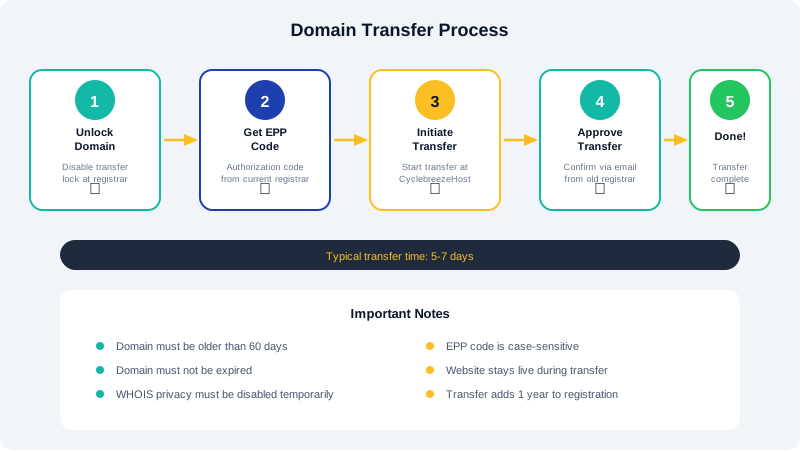
Pre-Transfer Requirements
Before initiating a transfer, complete these steps at your current registrar:
-
Unlock your domain. Most registrars lock domains to prevent unauthorized transfers. Log in to your current registrar and disable the domain lock (also called transfer lock or registrar lock).
-
Obtain your EPP code (Authorization Code). This is a unique code that authorizes the transfer. Request it from your current registrar. It is usually found in your domain management dashboard or can be emailed to the registrant email address on file.
-
Disable WHOIS Privacy Protection. Some registrars require you to temporarily turn off privacy or ID protection services before a transfer can be approved. You can re-enable privacy at CyclebreezeHost after the transfer completes.
-
Verify your registrant email. Transfer approval emails will be sent to the email address listed in the WHOIS record. Make sure it is a valid, accessible address.
-
Check the domain age. ICANN policy prevents transfers within 60 days of initial registration or a previous transfer.
Initiating the Transfer
- Log in to the CyclebreezeHost Client Area.
- Go to Domains > Transfer Domains to Us.
- Enter the domain name you want to transfer.
- Enter the EPP/Authorization code when prompted.
- Select any add-on services such as ID Protection.
- Complete the payment. Domain transfers include a one-year renewal added to your current expiration date.
The Approval Process
After you submit the transfer request, several things happen:
- CyclebreezeHost sends the transfer request to the current registrar.
- You receive an approval email at the registrant email address. Click the approval link to authorize the transfer. This is a critical step — without your approval, the transfer will not proceed.
- Your current registrar processes the release. Some registrars release the domain immediately upon approval, while others may take up to five days.
DNS Considerations
During the transfer, your existing DNS records remain in effect. However, to avoid any disruption:
- Update nameservers before transferring if you want your site to point to CyclebreezeHost immediately. You can do this at your current registrar.
- Alternatively, update nameservers after the transfer from the CyclebreezeHost client area once the domain is under your account.
- If you are currently using custom DNS records (MX, CNAME, etc.), note them down and recreate them in CyclebreezeHost's DNS management after the transfer.
Transfer Timeline
| Stage | Typical Duration |
|---|---|
| Submit transfer request | Immediate |
| Approval email sent | Within 24 hours |
| Registrar processing | 1–5 days |
| Transfer complete | 5–7 days total |
After the Transfer
Once the transfer is complete, you will receive a confirmation email. Log in to your CyclebreezeHost client area to verify the domain appears under your account, set your preferred nameservers, and enable ID Protection and auto-renewal.
Contact our support team if your transfer is taking longer than expected or if you encounter any issues.