Managed vs Unmanaged VPS Explained
When you order a VPS or dedicated server from CyclebreezeHost, you will see a choice between managed and unmanaged options. Understanding the difference helps you choose the right level of service for your technical skills and workload — and avoid unexpected surprises about what is included.
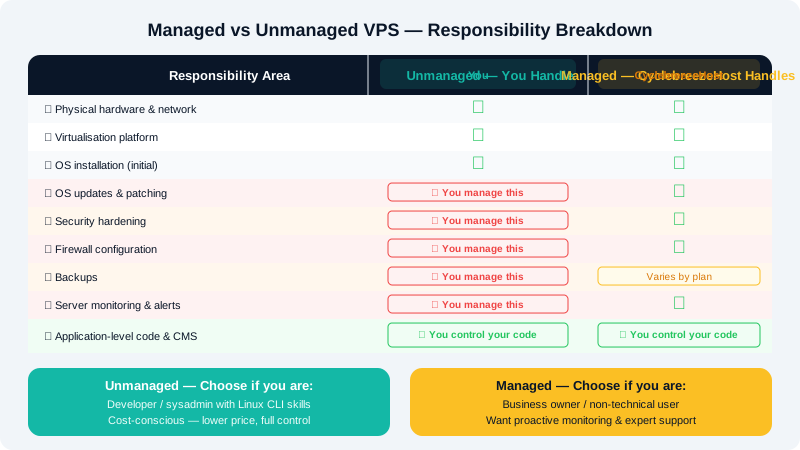
The Core Difference
An unmanaged VPS gives you a server with an operating system installed. Everything from that point forward is your responsibility: software installation, updates, security hardening, backups, and troubleshooting. CyclebreezeHost manages the physical hardware, network connectivity, and virtualisation layer — but not the OS or anything running inside it.
A managed VPS adds a layer of hands-on server administration from the CyclebreezeHost team. The exact scope varies by plan, but typically includes OS-level monitoring, patching, and assistance with server-level issues.
Responsibility Breakdown
| Area | Unmanaged | Managed |
|---|---|---|
| Physical hardware & network | CyclebreezeHost | CyclebreezeHost |
| Virtualisation platform | CyclebreezeHost | CyclebreezeHost |
| Server uptime & power | CyclebreezeHost | CyclebreezeHost |
| OS installation | CyclebreezeHost (initial) | CyclebreezeHost |
| OS updates & patching | You | CyclebreezeHost |
| Security hardening | You | CyclebreezeHost |
| Firewall configuration | You | CyclebreezeHost |
| Software installation (web server, PHP, etc.) | You | Varies by plan |
| Application-level issues (your code/CMS) | You | You |
| Backups | You | Varies by plan |
| Performance tuning | You | Varies by plan |
| Server monitoring & alerts | You | CyclebreezeHost |
Unmanaged VPS — Who It Is For
An unmanaged server is suited to:
- Developers and system administrators who are comfortable on the Linux command line
- Businesses that have in-house IT staff
- Users who want full control over their server environment without restrictions
- Cost-conscious users who can handle administration themselves
With an unmanaged VPS, you have root access and can install any software, customise the OS, and configure services exactly as needed. In return, you bear responsibility for keeping the server secure and functional.
Typical tasks you will handle yourself:
- Running
apt update && apt upgradeordnf updateregularly - Configuring
ufworfirewalldto restrict unnecessary ports - Setting up automated backups using cron jobs or backup software
- Monitoring disk space, CPU, and memory usage
- Responding to and recovering from security incidents
Managed VPS — Who It Is For
A managed server is suited to:
- Business owners and non-technical users who want a server without the administrative overhead
- Teams whose core competency is their application, not server management
- Anyone who wants proactive monitoring and rapid response if something goes wrong
- Users migrating from shared hosting who need more resources but not the complexity
With a managed plan, the CyclebreezeHost team handles routine server administration so you can focus on your website or application. If an issue arises at the server level, you have direct access to engineers who can investigate and resolve it.
Control Panels on VPS
Either server type can have a control panel added to it. cPanel/WHM is the most common choice for web hosting — it provides a familiar graphical interface for managing websites, email, databases, and DNS without needing command-line knowledge. CyclebreezeHost can license cPanel/WHM for your VPS regardless of whether the server is managed or unmanaged.
Other popular options include DirectAdmin and Plesk. If you are not sure which control panel is right for your needs, contact our support team for guidance.
Choosing Between the Two
Ask yourself these questions:
- Are you comfortable managing a Linux server via SSH? If not, choose managed or add a control panel.
- Do you have time to apply updates and monitor the server regularly? Unmanaged requires ongoing attention.
- What is the cost of downtime for your business? Managed plans typically include monitoring that catches issues before they become outages.
- Do you need a specific OS or software configuration? Unmanaged gives you more flexibility to customise.
Can You Switch Between the Two?
Yes. You can upgrade from an unmanaged to a managed plan by contacting CyclebreezeHost support. Similarly, if you develop the technical skills to manage your own server, you can move to an unmanaged plan at renewal.
For a detailed comparison of current managed and unmanaged VPS plans and pricing, visit www.cyclebreezehost.com or open a chat with our team at https://clients.cyclebreezehost.com.