Managing Application Environment Variables
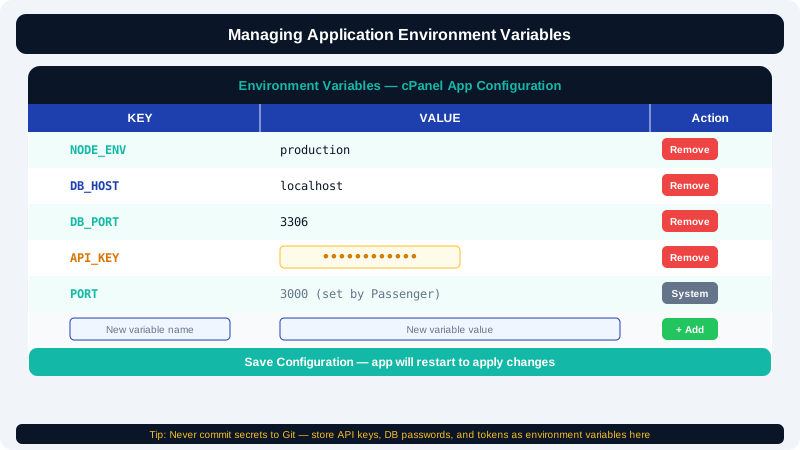
Environment variables let you pass configuration to your application without hardcoding sensitive values — such as database passwords, API keys, or feature flags — directly into your source code. CyclebreezeHost's Setup Node.js App and Setup Python App tools in cPanel include a dedicated section for managing these variables safely.
Why Use Environment Variables
Storing configuration in environment variables instead of code files gives you several advantages:
- Security — secrets never appear in version control or shared repositories.
- Portability — the same codebase runs in development and production with different configurations.
- Ease of change — you can update a value without modifying or redeploying your code.
Accessing the Environment Variables Section
- Log in to cPanel and open Setup Node.js App or Setup Python App under the Software section.
- Click the edit (pencil) icon next to your existing application, or open its configuration page.
- Scroll down to the Environment Variables section.
Adding a Variable
- Click Add Variable (or the + button, depending on your cPanel version).
- Enter the variable Name — use uppercase with underscores, e.g.,
DATABASE_URL. - Enter the Value — the actual secret or configuration string.
- Click Save or the checkmark to confirm.
- Repeat for each variable you need.
Important: After adding or editing variables, click the main Save button for the application, then Restart the app so the new values are loaded into the running process.
Common Variables by Framework
| Variable | Example Value | Used By |
|---|---|---|
NODE_ENV | production | Node.js (Express, etc.) |
PORT | 3000 | Node.js (set automatically by Passenger) |
DATABASE_URL | mysql://user:pass@localhost/dbname | Node.js, Python |
SECRET_KEY | random string | Django, Flask |
DJANGO_SETTINGS_MODULE | myproject.settings.production | Django |
JWT_SECRET | random string | Any JWT-based API |
API_KEY | third-party key | Any external service |
Editing an Existing Variable
- Locate the variable in the list.
- Click the edit icon next to it.
- Update the value and click Save.
- Restart your application to apply the change.
Deleting a Variable
- Click the delete (bin) icon next to the variable you want to remove.
- Confirm the deletion.
- Restart your application.
Removing a variable that your application still reads will likely cause a runtime error, so verify your code no longer references the variable before deleting it.
Accessing Variables in Your Code
Node.js
const dbUrl = process.env.DATABASE_URL;
const secretKey = process.env.SECRET_KEY;
Python
import os

db_url = os.environ.get("DATABASE_URL")
secret_key = os.environ.get("SECRET_KEY")
Use os.environ.get("KEY") rather than os.environ["KEY"] in Python to avoid a KeyError if the variable is missing — it returns None instead.
Security Best Practices
- Never commit a
.envfile containing real secrets to version control. - Rotate secrets immediately if they are accidentally exposed.
- Use a unique
SECRET_KEYorJWT_SECRETper environment — do not share keys between staging and production. - Restrict database user permissions to only the operations your app actually needs.
If you need help configuring your application's environment, contact CyclebreezeHost support at info@cyclebreezehost.com — available 24/7.