Pointing Your Domain to an External Host
If your domain is registered with CyclebreezeHost but your website or services are hosted elsewhere, you have two ways to direct traffic to the external provider: change the nameservers to the external host's DNS, or keep CyclebreezeHost's nameservers and update individual DNS records. This guide covers both methods.
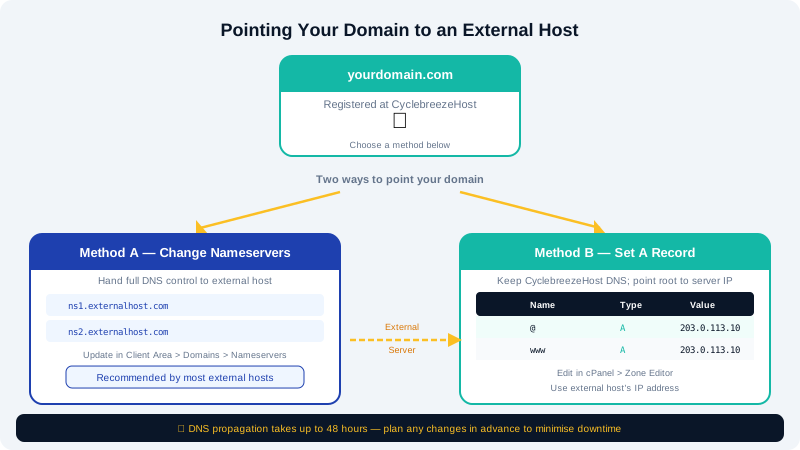
Method 1 — Change Nameservers (Recommended by Most External Hosts)
Switching nameservers hands full DNS control to the external provider. Use this method when the external host asks you to "point your nameservers" or provides ns1.example.com-style values.
- Log in to the Client Area at https://clients.cyclebreezehost.com.
- Click Domains, then select the domain you want to update.
- In the domain management panel, click Nameservers.
- Select Use Custom Nameservers.
- Enter the nameserver values provided by the external host (usually two or more, e.g.
ns1.externalhost.comandns2.externalhost.com). - Click Save Changes.
DNS propagation typically completes within 1–24 hours, although most updates are visible within a few hours.
Important: After changing nameservers, all DNS records (including MX and email records) are controlled by the external provider. Update any email or subdomain records there.
Method 2 — Update Individual DNS Records
If you only need to point the website while keeping email or other services on CyclebreezeHost, update individual records instead of changing nameservers. This method uses the Zone Editor in cPanel.
Pointing the Root Domain and www
- Log in to cPanel at
https://yourdomain.com/cpanel(or via the Client Area). - In the Domains section, click Zone Editor.
- Click Manage next to the domain you want to update.
To point the root domain (@):
- Find the
Arecord with Name set to your domain name (e.g.yourdomain.com.). - Click Edit, replace the IP address with the external host's IP, and click Save Record.
To point www:
- Find the
Arecord with Name set towww. - Edit it with the same external IP and save.
If the external host provides a hostname rather than an IP, use a CNAME record instead of an A record for www, pointing to the hostname they provided.
Common DNS Record Reference
| Record Type | When to Use |
|---|---|
A | Map hostname to an IPv4 address |
AAAA | Map hostname to an IPv6 address |
CNAME | Alias one hostname to another hostname |
MX | Direct email to a mail server |
Checking Propagation
After saving changes, you can verify propagation using a tool such as https://dnschecker.org. Enter your domain name and select the record type to see results from multiple global locations.
Reverting to CyclebreezeHost Hosting
If you want to return your domain to CyclebreezeHost hosting:
- In the Client Area, change the nameservers back to CyclebreezeHost's nameservers (shown in your hosting welcome email or in the Nameservers panel).
- Or, if you kept CyclebreezeHost nameservers, restore the
Arecords to your cPanel hosting account's IP address.
Your cPanel hosting IP is listed in the Client Area under your hosting product details.
Need Help?
The CyclebreezeHost support team is available 24/7 at info@cyclebreezehost.com or via a support ticket in the Client Area.