Recognising and Avoiding Phishing Scams
Phishing is one of the most common ways hosting accounts and domains are compromised. Attackers send emails that appear to come from your hosting provider, domain registrar, or payment processor, trying to trick you into handing over your login credentials or payment details. Knowing how to spot these attempts protects your websites, domains, and business data.
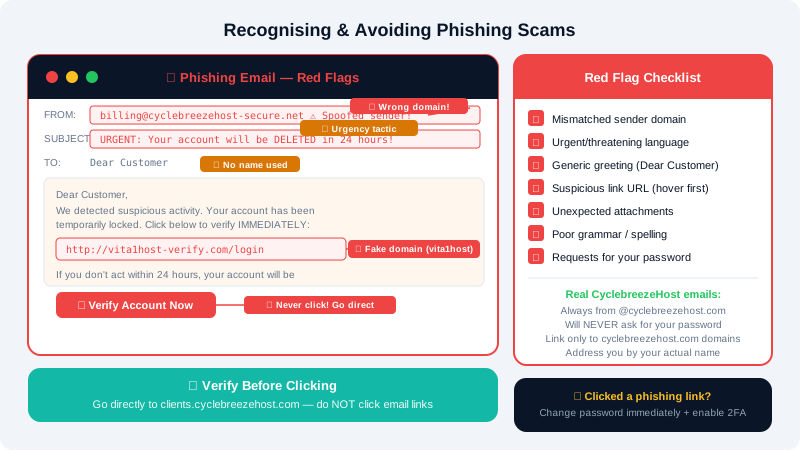
How Phishing Attacks Work
A typical phishing attempt follows this pattern:
- You receive an email that looks like it is from a trusted source — such as CyclebreezeHost, a registrar, or your bank.
- The email creates urgency: your account is about to be suspended, a payment failed, or your domain is expiring.
- You are asked to click a link and log in or provide payment details.
- The link goes to a fake website designed to capture what you enter.
- The attacker uses your credentials to access your real account.
Red Flags in Phishing Emails
Learn to recognise these warning signs before clicking anything:
- Mismatched sender address — the display name says "CyclebreezeHost Support" but the actual email address is something like
billing@cyclebreezehost-secure.net. Always check the fullFromaddress. - Urgent or threatening language — phrases like "Your account will be deleted in 24 hours" or "Immediate action required" are designed to bypass your judgement.
- Generic greetings — "Dear Customer" or "Dear User" instead of your actual name.
- Suspicious links — hover over any link (without clicking) and check whether the URL matches the legitimate domain. Legitimate CyclebreezeHost emails link to
cyclebreezehost.comorclients.cyclebreezehost.com. - Unexpected attachments — invoices or receipts you were not expecting, especially
.zip,.exe, or.docfiles. - Poor grammar and spelling — professional companies proofread their communications.
- Requests for passwords — CyclebreezeHost will never ask for your password by email.
Verifying Legitimate CyclebreezeHost Emails
All billing communications and support replies from CyclebreezeHost come from addresses ending in @cyclebreezehost.com. If you receive an email and are unsure whether it is genuine:
- Do not click any links in the email.
- Open a new browser tab and go directly to https://clients.cyclebreezehost.com.
- Log in and check whether there are any real notifications, invoices, or tickets that match the email's claim.
- If nothing is there, the email is likely fraudulent.
You can also forward the suspicious email to info@cyclebreezehost.com so our team can confirm whether it came from us.
Protecting Your Domain from Hijacking
Domains are a high-value target. Once transferred away, recovering a domain can be slow and difficult. Reduce the risk with these steps:
- Enable domain lock (also called Registrar Lock or Transfer Lock) in your Client Area to prevent unauthorised transfer requests.
- Enable two-factor authentication on your CyclebreezeHost Client Area so that even if your password is stolen, a login attempt is blocked.
- Keep your WHOIS contact email address current — domain transfer approval emails go there, and an attacker who controls that email address can approve a transfer without your knowledge.
What to Do If You Clicked a Phishing Link
If you accidentally clicked a link and entered your credentials:
- Change your CyclebreezeHost Client Area password immediately at https://clients.cyclebreezehost.com.
- Change your cPanel password from the Client Area.
- Enable two-factor authentication on your Client Area account if it is not already active.
- Scan your device for malware — phishing pages sometimes install browser hijackers or keyloggers.
- Contact CyclebreezeHost support at info@cyclebreezehost.com or open a ticket at https://clients.cyclebreezehost.com so we can review your account for suspicious activity.
- If you entered payment card details, contact your bank immediately.
Building Ongoing Awareness
| Good Habit | Why It Matters |
|---|---|
| Always navigate directly to sites rather than clicking email links | Bypasses fake login pages entirely |
| Use a password manager | Autofill only works on the real domain — it will not fill in a fake site |
| Enable 2FA on all accounts | A stolen password alone cannot be used to log in |
| Keep software and browsers updated | Patches vulnerabilities exploited by phishing payloads |
| Pause before acting on urgent emails | Urgency is the attacker's primary tool |
Our support team is available 24/7 at info@cyclebreezehost.com or via ticket at https://clients.cyclebreezehost.com if you ever want a second opinion on a suspicious email.