SSL Certificates: Setup and Troubleshooting
All CyclebreezeHost hosting plans include free AutoSSL certificates powered by Let's Encrypt. SSL encrypts the connection between your visitors and your server, and is required for HTTPS.
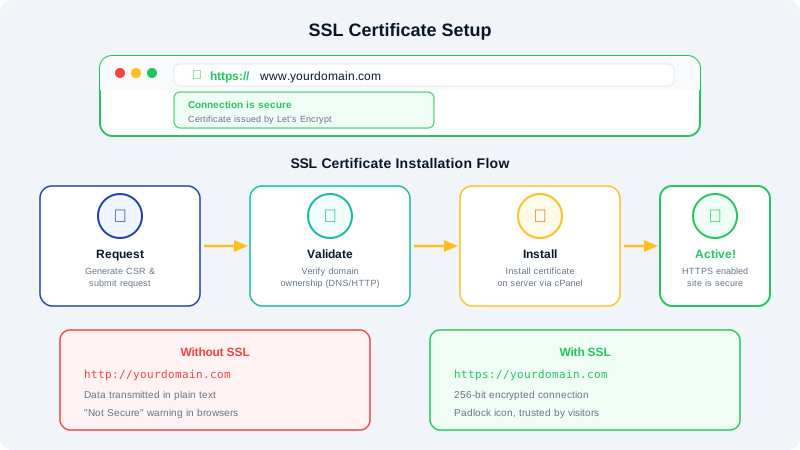
How AutoSSL Works
AutoSSL automatically provisions and renews SSL certificates for all domains on your account. After your domain's DNS points to our servers, AutoSSL will issue a certificate within a few hours — no action needed on your part.
Checking SSL Status
- Log into cPanel.
- Click SSL/TLS Status under the Security section.
- You will see a list of your domains with their SSL status (green checkmark means active).
Forcing HTTPS
After your SSL certificate is active, redirect all HTTP traffic to HTTPS:
- In cPanel, click Domains under the Domains section.
- Find your domain and toggle Force HTTPS Redirect to ON.
Alternatively, add this to your .htaccess file:
RewriteEngine On
RewriteCond %{HTTPS} off
RewriteRule ^(.*)$ https://%{HTTP_HOST}%{REQUEST_URI} [L,R=301]
Troubleshooting
SSL Certificate Not Issuing
- DNS not pointing to our servers: AutoSSL can only issue certificates when your domain resolves to your CyclebreezeHost IP. Verify your DNS settings.
- CAA record blocking issuance: If you have a CAA record, ensure it includes
letsencrypt.org. - Too many recent requests: Let's Encrypt has rate limits. If you have hit the limit, wait a few hours and try again.
Mixed Content Warnings
If your site shows a padlock with a warning, some resources (images, scripts, stylesheets) are still loading over HTTP. Update those URLs to use HTTPS or use protocol-relative URLs.
Certificate Expired
AutoSSL renews certificates automatically. If a certificate expires, it usually means DNS has changed or there is an issue with the domain validation. Check your DNS settings and run AutoSSL manually from cPanel.
Installing a Purchased SSL Certificate
If you have a certificate from a third-party provider:
- In cPanel, click SSL/TLS under Security.
- Click Manage SSL Sites.
- Select your domain.
- Paste your certificate, private key, and CA bundle.
- Click Install Certificate.