Transferring a Domain Away from CyclebreezeHost
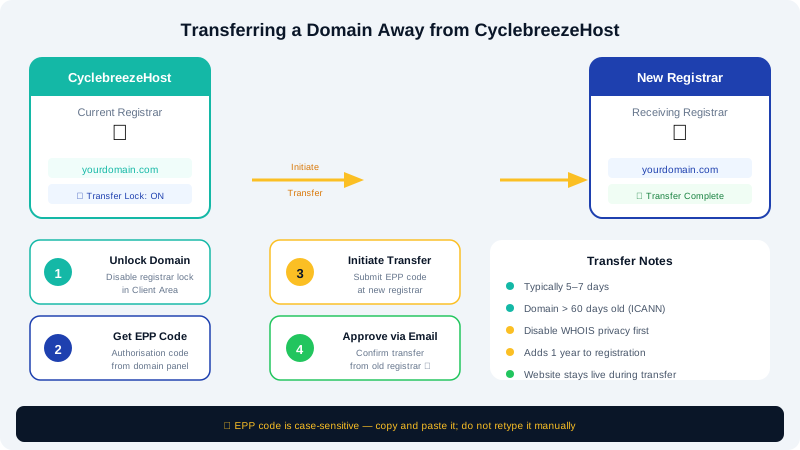
If you need to move a domain to a different registrar, you must complete a few preparatory steps before the receiving registrar can accept the transfer. This guide walks you through unlocking your domain, retrieving the authorisation (EPP) code, and initiating the transfer.
Before You Begin
Keep the following in mind before starting a transfer:
- Most domain transfers take 5–7 days to complete after the receiving registrar initiates them.
- Your domain must have been registered or previously transferred at least 60 days ago (ICANN policy for gTLDs such as
.com,.net,.org). - Ensure the domain is not expiring within 15 days — renew it first if necessary.
- Verify that your contact email on file is accessible, as the registry may send a confirmation request.
Step 1 — Disable Domain Lock
- Log in to the Client Area at https://clients.cyclebreezehost.com.
- Click Domains in the top navigation, then select the domain you want to transfer.
- In the domain management panel, locate the Registrar Lock section.
- Toggle the lock to Disabled and save the change.
The lock prevents unauthorised transfers; it must be off before any transfer can proceed.
Step 2 — Retrieve Your EPP / Authorisation Code
- From the same domain management panel, find the EPP Code (sometimes labelled Auth Code or Transfer Secret) section.
- Click Request EPP Code or Send to Email. CyclebreezeHost will send the code to the registrant email address on record.
- Check your inbox and copy the code — it is case-sensitive.
If you do not receive the email within 15 minutes, check your spam folder or contact support at info@cyclebreezehost.com.
Step 3 — Disable Privacy Protection (if active)
If WHOIS privacy is enabled, the registrant email shown in the public WHOIS record will be masked. Some registrars require the WHOIS email to match exactly.
- In the domain panel, locate ID Protection or WHOIS Privacy.
- Set it to Disabled before initiating the transfer.
You can re-enable privacy at the receiving registrar once the transfer completes.
Step 4 — Initiate the Transfer at the New Registrar
- Visit the receiving registrar's website and start a domain transfer.
- Enter your domain name and paste the EPP code when prompted.
- Complete any payment or verification steps required by the new registrar.
Step 5 — Approve the Transfer Request
During the transfer window you may receive an email from the registry asking you to approve or reject the transfer. Click the approval link promptly — this speeds up the process. If you take no action, most transfers complete automatically after 5 days.
Special Note — .co.za and Other ZA Domains
South African domains (.co.za, .org.za, .net.za, etc.) use a different transfer mechanism managed by the ZACR registry. Instead of an EPP code, ZA transfers require the receiving registrar to submit a Registrant Transfer request directly through the registry. Contact both CyclebreezeHost support and your new registrar for guidance specific to ZA domains.
Cancelling a Transfer
If you change your mind, you can lock your domain again at any time before the transfer completes. Log in to the Client Area, re-enable the Registrar Lock, and notify the receiving registrar to cancel their transfer request.
Need Help?
Contact the CyclebreezeHost support team at info@cyclebreezehost.com or open a ticket in the Client Area — we are available 24/7.