Troubleshooting Email Delivery Issues
If your emails are not being delivered or you are not receiving messages, work through these common causes and solutions.
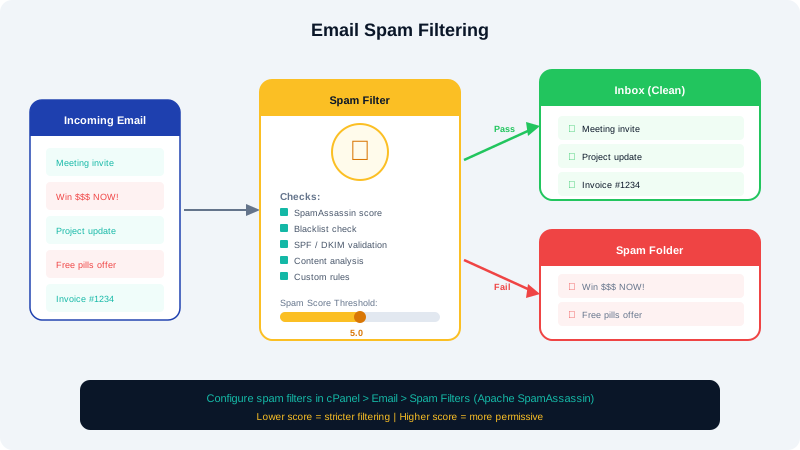
Emails Not Being Received
Check MX Records
Your domain's MX records must point to the correct mail server. In cPanel, go to Zone Editor and verify that your MX records point to mail.yourdomain.com (or the server specified in your welcome email).
Check Mailbox Quota
If your mailbox is full, new messages will bounce. In cPanel, go to Email Accounts and check the usage. Increase the quota or delete old messages to free up space.
Check Spam Filters
Messages may be landing in your spam or junk folder. Log into webmail and check the Junk folder. If legitimate emails are being flagged, adjust SpamAssassin settings in cPanel under Spam Filters.
Verify the Email Account Exists
If someone is emailing an address that does not exist on your account, the message will bounce. Ensure the email account has been created in cPanel.
Emails Not Being Sent
Check SMTP Authentication
Your email client must use authenticated SMTP to send mail. Verify that your outgoing server settings include authentication with your full email address and password.
IP Reputation
If your server IP has been flagged by spam blacklists, outgoing email may be blocked. Contact CyclebreezeHost support to check your IP status and request delisting if needed.
SPF Record
An incorrect or missing SPF record can cause receiving servers to reject your email. Your SPF record should include your hosting server. A basic SPF record looks like:
v=spf1 +a +mx +ip4:YOUR_SERVER_IP ~all
Emails Going to Spam
Set Up Authentication Records
Configure all three email authentication methods:
- SPF: Authorizes your server to send email for your domain.
- DKIM: Adds a cryptographic signature to outgoing emails. Enable it in cPanel under Email Deliverability.
- DMARC: Tells receiving servers how to handle unauthenticated email. Add a TXT record for
_dmarc.yourdomain.com.
Avoid Spam Triggers
- Do not use all-caps subject lines.
- Avoid excessive links or images with minimal text.
- Include an unsubscribe link in marketing emails.
- Do not send to purchased email lists.
Still Having Issues?
If you have worked through these steps and are still experiencing problems, open a support ticket with CyclebreezeHost. Include the sender address, recipient address, approximate time of the issue, and any bounce-back error messages you received.