Understanding Disk Space and Bandwidth Usage
Every hosting plan comes with allocated disk space and bandwidth. Understanding how these resources work helps you keep your website running smoothly and avoid unexpected interruptions.
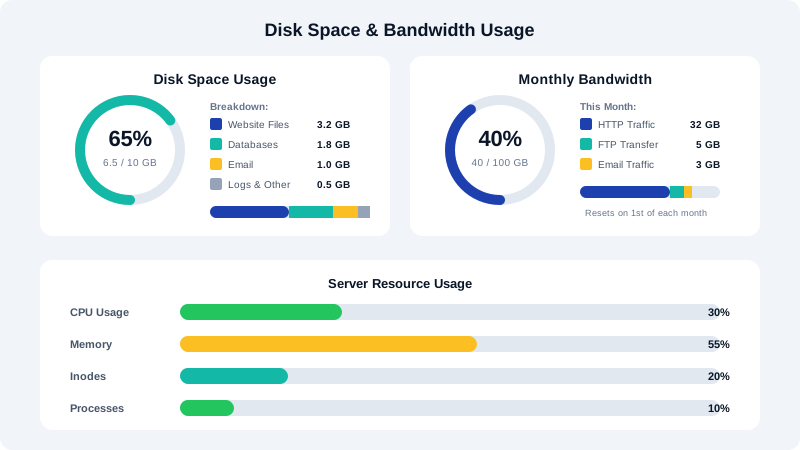
What Is Disk Space?
Disk space refers to the total amount of storage available on the server for your hosting account. This includes everything stored on your account:
- Website files (HTML, CSS, JavaScript, images, videos)
- Email messages and attachments
- MySQL databases
- Backups stored within your account
- Log files
Think of disk space as the size of your hard drive. Once it is full, you cannot add new content until you free up space or upgrade your plan.
What Is Bandwidth?
Bandwidth (sometimes called data transfer) is the total amount of data transferred between your server and your visitors over a given billing period. Every time someone visits your website, their browser downloads your pages, images, and other assets, and that transfer counts toward your bandwidth allowance.
Factors that affect bandwidth usage include:
- Number of visitors: More visitors means more data transferred.
- Page size: Larger pages with unoptimized images consume more bandwidth per visit.
- File downloads: If you offer downloadable files, each download uses bandwidth.
- Email traffic: Sending and receiving emails also counts toward bandwidth.
Checking Your Usage in cPanel
- Log in to cPanel and look at the Statistics sidebar on the right side of the dashboard.
- You will see current usage for Disk Usage and Monthly Bandwidth Transfer displayed as both a number and a visual bar.
- For a detailed breakdown, click Disk Usage under the Files section to see which directories are consuming the most space.
- To review bandwidth details, go to Bandwidth under the Metrics section for a daily, weekly, and monthly breakdown.
Tips to Reduce Disk Space Usage
- Compress images before uploading. Use tools like TinyPNG or ShortPixel to optimize file sizes.
- Delete old backups that are stored within your hosting account.
- Clean up unused email messages, especially those with large attachments.
- Remove unused CMS installations, themes, and plugins.
- Use external storage for large media files. Consider a CDN or cloud storage service for video content.
Tips to Reduce Bandwidth Usage
- Enable caching through a plugin like WP Super Cache or W3 Total Cache to reduce server requests.
- Use a CDN (Content Delivery Network) to serve static files from edge servers closer to your visitors.
- Optimize images so they are appropriately sized for the web.
- Enable GZIP compression in cPanel or through your .htaccess file to reduce the size of data transferred.
- Block hotlinking to prevent other sites from embedding your images and consuming your bandwidth.
What Happens When You Exceed Limits
If you exceed your disk space allocation, you may be unable to receive new emails, upload files, or create database entries. If you exceed your bandwidth allocation, your website may become temporarily inaccessible until the next billing cycle or until you upgrade your plan. CyclebreezeHost sends usage alerts by email before you reach your limits, giving you time to take action.
Consider upgrading your hosting plan if you consistently approach your resource limits. Contact our support team for personalized recommendations.