Understanding Renewals and Auto-Renew
All CyclebreezeHost services — hosting plans, domain names, SSL certificates, and add-ons — are billed on a recurring basis. Understanding how renewals work, and how to control them, helps you avoid unexpected charges and unplanned service interruptions.
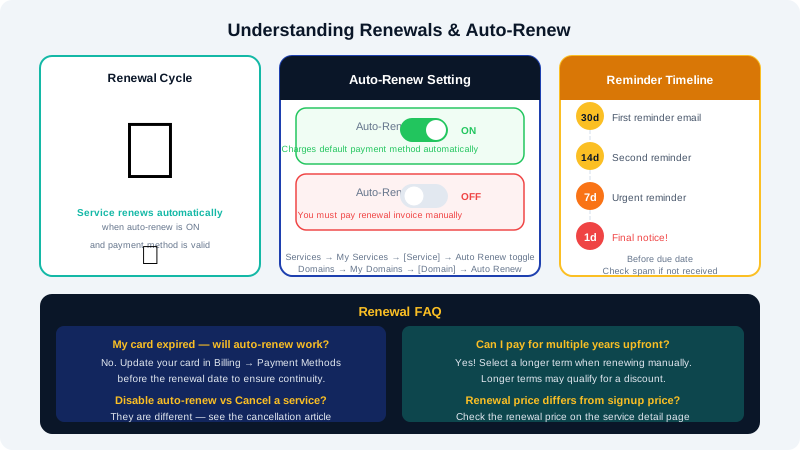
How Renewals Work
Each service in your account has an expiry or next due date. When that date approaches, CyclebreezeHost generates a renewal invoice and emails it to your billing address. If auto-renew is enabled and a valid payment method is on file, the invoice is paid automatically. If auto-renew is off, you need to log in and pay the invoice manually before the service expires.
Renewal reminder emails are sent:
- 30 days before the due date
- 14 days before the due date
- 7 days before the due date
- 1 day before the due date
If you are not receiving these emails, check your spam filter and confirm your billing email address in the Client Area.
What Is Auto-Renew?
Auto-renew instructs CyclebreezeHost to automatically charge your default payment method when a renewal invoice is generated. This ensures services remain active without requiring manual action each billing cycle.
Auto-renew is enabled by default for new services. You can turn it on or off for each service individually.
How to Enable or Disable Auto-Renew
For a hosting service
- Log in to the Client Area at https://clients.cyclebreezehost.com.
- Go to Services > My Services and click the service you want to manage.
- On the service detail page, look for the Auto Renew toggle or setting.
- Switch it On to enable or Off to disable.
- Changes take effect immediately.
For a domain name
- Go to Domains > My Domains and click the domain.
- On the domain management page, find the Auto Renew section.
- Toggle it on or off as needed.
- Click Save Changes if prompted.
Important for domains: Disabling auto-renew on a domain does not cancel it — you can still renew manually before it expires. However, if you forget and the domain enters the expiry grace or redemption period, recovery fees apply. See the article Understanding Domain Renewal, Grace, and Redemption Periods for details.
Renewal Pricing
Services renew at the price in effect at the time of renewal, which may differ from your original signup price (particularly for promotional or introductory offers). You can always check the upcoming renewal price on the service detail page in the Client Area before the invoice is generated.
Managing Renewal Dates
If you want multiple services to renew on the same date (for convenience or budgeting purposes), contact CyclebreezeHost support at info@cyclebreezehost.com and we can align renewal dates where possible. A prorated adjustment will apply.
Cancelling vs. Disabling Auto-Renew
These are not the same thing:
| Action | Effect |
|---|---|
| Disable auto-renew | Stops automatic payment; service still renews if you pay manually |
| Cancel a service | Terminates the service at the end of the billing period; no future invoices generated |
If you no longer want a service, submit a cancellation request rather than simply turning off auto-renew. This prevents the service from sitting in an unpaid state and accumulating overdue invoices. See the article How to Cancel a Service for the cancellation process.
Frequently Asked Questions
My card expired — will auto-renew still work? No. Auto-renew requires a valid payment method on file. Update your card in Billing > Payment Methods before the renewal date to ensure uninterrupted service.
Can I pay for multiple years upfront to avoid annual renewals? Yes, for most services. When renewing manually, select a longer renewal term from the term drop-down on the invoice or service page. Longer terms may qualify for a discount.
I turned off auto-renew but still got charged — why? If the renewal invoice was already generated before you disabled auto-renew, the existing invoice may have been processed automatically. Check your invoice history in Billing > My Invoices and contact support if you need clarification.