Understanding WHOIS Privacy Protection
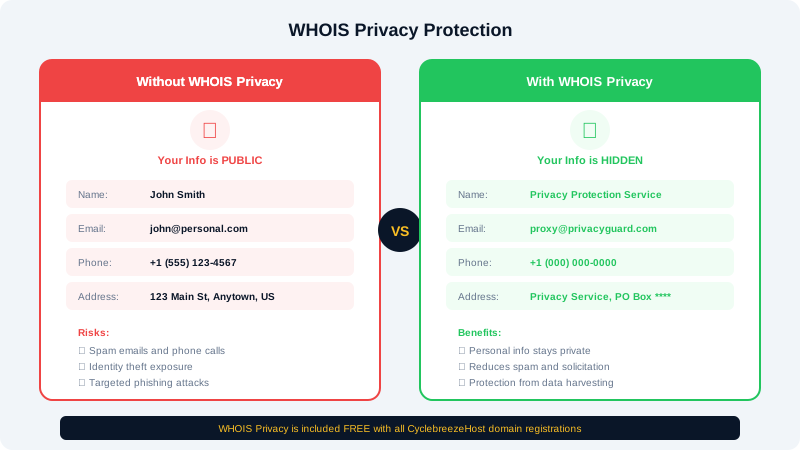
When you register a domain name, your personal contact information is stored in a public database called WHOIS. Without privacy protection, anyone can look up your details. This guide explains how WHOIS works, why privacy matters, and how to enable protection on your CyclebreezeHost domains.
What Is WHOIS?
WHOIS is a publicly accessible database maintained by domain registrars that stores contact information for every registered domain name. It was originally designed to help identify who is responsible for a domain, and it is used by network administrators, law enforcement, and others to contact domain owners.
You can query any domain's WHOIS data using online tools such as whois.icann.org or by running a whois command in your terminal.
What Information Is Exposed?
Without privacy protection, a WHOIS lookup on your domain reveals:
- Registrant name (your legal name or organization)
- Email address
- Phone number
- Physical mailing address (street, city, state, postal code, country)
- Domain registration and expiration dates
- Registrar name
- Nameserver information
This level of public exposure can lead to unwanted contact, spam emails, marketing calls, and in some cases, identity theft or social engineering attacks.
How WHOIS ID Protection Works
When you enable WHOIS ID Protection (also called WHOIS Privacy or Domain Privacy), the registrar replaces your personal contact details with proxy information. Instead of your name and address, the WHOIS record shows:
- A privacy service organization name
- A proxy email address that forwards to your real inbox
- A generic phone number and address
Your domain remains fully under your control. The privacy service simply acts as a shield between your real information and the public database.
Enabling WHOIS Privacy on Your Domain
- Log in to the CyclebreezeHost Client Area.
- Navigate to Domains > My Domains.
- Click on the domain you want to protect.
- Look for the ID Protection option on the domain management page.
- Click Enable to activate privacy protection.
- Confirm the change. ID Protection is included free with most CyclebreezeHost domain registrations.
You can also enable it during the domain registration process by selecting the ID Protection add-on at checkout.
GDPR and WHOIS
Since the European Union's General Data Protection Regulation (GDPR) came into effect, many registrars and registries have begun redacting personal information from WHOIS results by default for registrants in applicable regions. However, this varies by registrar and TLD. Enabling ID Protection provides consistent privacy regardless of your location or the TLD policies, giving you reliable protection across the board.
Why WHOIS Privacy Matters
- Prevents spam. Publicly listed email addresses are harvested by spammers. Privacy protection keeps your real email hidden.
- Reduces unwanted solicitation. Domain owners without privacy frequently receive sales calls and postal mail from companies scanning WHOIS data.
- Protects against social engineering. Attackers can use publicly available personal information to impersonate you or attempt account takeovers.
- Personal safety. For individuals running personal blogs or small businesses from home, keeping your home address private is important.
Disabling WHOIS Privacy
You may need to temporarily disable privacy protection in certain situations, such as during a domain transfer. To disable it, follow the same steps above and click Disable instead. Remember to re-enable it once the process requiring the change is complete.
If you have questions about WHOIS privacy or need help enabling it on your domain, our support team is happy to assist.