Understanding Your Billing Cycle
CyclebreezeHost bills services on a recurring cycle based on the billing term you chose when you ordered. Understanding how invoices are generated, when payment is due, and how renewal dates are calculated helps you stay on top of your account and avoid unexpected charges or service interruptions.
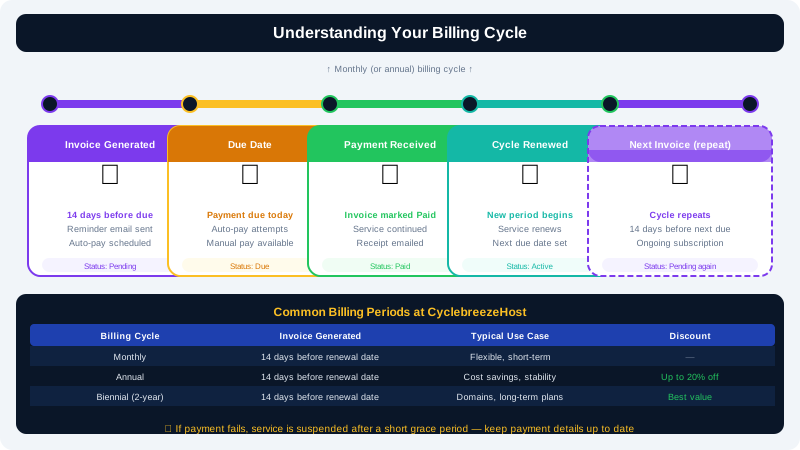
Billing Terms
When ordering a service, you select a billing frequency. Common terms are:
| Term | Description |
|---|---|
| Monthly | Billed every calendar month |
| Quarterly | Billed every 3 months |
| Semi-Annually | Billed every 6 months |
| Annually | Billed every 12 months |
| Biennially | Billed every 24 months |
Longer billing terms usually come with a discount. You can see the price per term on the relevant product page. Once a service is active, you can change its billing term at renewal time — contact support or use the Upgrade/Downgrade option in the Client Area before the next invoice is generated.
How Invoice Dates Work
CyclebreezeHost generates renewal invoices 14 days before the next due date. This gives you time to review the invoice, ensure your payment method is valid, and take action if needed.
Example:
- Service start date: 1 January (annual term)
- Next renewal due: 1 January the following year
- Invoice generated: 18 December
The due date shown on the invoice is the date by which payment must be received to keep the service active without interruption.
Auto-Renewal and Automatic Payments
If you have a valid payment method saved in the Client Area, CyclebreezeHost will attempt to charge it automatically on the invoice due date.
- If the charge is successful, the service is renewed immediately and you receive a payment confirmation email.
- If the charge fails (e.g., expired card), you will receive a failed payment notice and the invoice will remain unpaid. Update your payment method and pay the invoice manually to avoid suspension.
To check whether auto-renewal is enabled for a service:
- Log in to the Client Area at https://clients.cyclebreezehost.com.
- Navigate to Services and click on the service.
- Look for the Auto Renew setting. Toggle it on if you want the service renewed automatically each cycle.
Prorated Charges
If you upgrade a service mid-cycle, CyclebreezeHost calculates a prorated charge for the remainder of the current billing period. This means you only pay the difference in price for the days remaining, not a full new period.
Example: You upgrade from a starter to a business plan halfway through a monthly cycle. Your next invoice will show:
- A prorated credit for the unused days of the starter plan.
- A prorated charge for the remaining days of the business plan.
- The full business plan price from the next renewal date onward.
Viewing Your Billing History
All past and current invoices are visible in the Client Area:
- Go to Billing > My Invoices.
- Use the status filter to show Paid, Unpaid, or All invoices.
- Click any invoice to view the itemised breakdown or download a PDF copy.
Service Renewal Date vs. Invoice Due Date
These two dates are related but distinct:
- Invoice due date — the date by which payment must be made.
- Service next renewal date — the date the service period rolls over.
For most services these are the same date. However, if an invoice is generated 14 days in advance, the invoice due date is set to the renewal date, and the invoice itself will appear 14 days earlier. Paying early does not shorten your service period — your next renewal date advances by one full billing term from when your current period ends.
Domain Billing
Domains follow the same cycle but have a stricter grace structure after expiry. See the article on Reactivating a Suspended or Expired Service for information on domain grace periods and redemption fees.
Changing Your Billing Currency
Your account currency is set when you register. If you need to change it, contact CyclebreezeHost support at info@cyclebreezehost.com — our team can advise on the process and any implications for existing invoices.
Questions About Your Invoice?
If a charge looks incorrect or you have questions about a specific invoice, open a support ticket in the Client Area at https://clients.cyclebreezehost.com or email info@cyclebreezehost.com. Our billing team is available 24/7.