Updating Nameservers for Your Domain
Nameservers tell the internet where to find your website. When you host your site with CyclebreezeHost, you need to make sure your domain's nameservers point to our servers. This guide explains what nameservers are and how to update them.
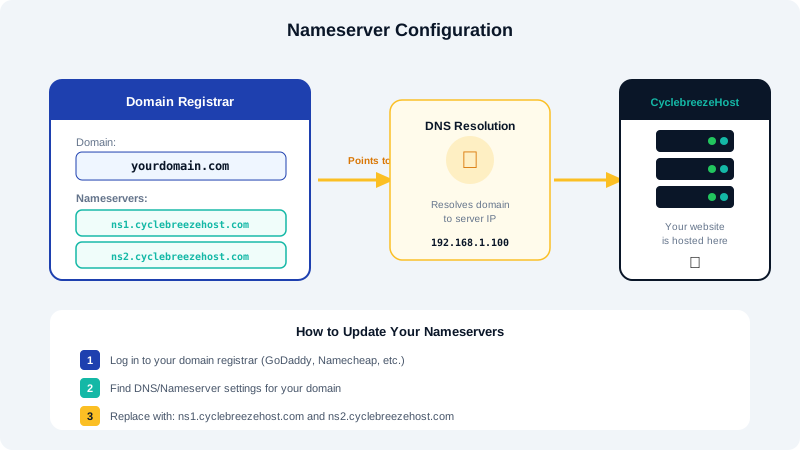
What Are Nameservers?
Nameservers are specialized DNS servers that translate your domain name (e.g., yourdomain.com) into the IP address of the server where your website is hosted. When someone types your domain into their browser, the nameservers direct that request to the correct server.
Every domain has at least two nameservers assigned to it for redundancy. If one nameserver is temporarily unavailable, the other ensures your website remains accessible.
CyclebreezeHost Nameservers
To point your domain to CyclebreezeHost, use the following nameservers:
ns1.cyclebreezehost.com
ns2.cyclebreezehost.com
These addresses are also included in your welcome email and are available in your client area under your hosting service details.
How to Update Nameservers
The process for updating nameservers depends on where your domain is registered.
If Your Domain Is Registered with CyclebreezeHost
- Log in to the CyclebreezeHost Client Area.
- Navigate to Domains > My Domains.
- Click on the domain you want to update.
- Click the Nameservers tab.
- Select Use default nameservers to automatically apply CyclebreezeHost nameservers, or select Use custom nameservers to enter different values.
- Click Change Nameservers to save.
If Your Domain Is Registered Elsewhere
- Log in to the control panel of your current domain registrar (e.g., GoDaddy, Namecheap, Google Domains).
- Find the domain management or DNS settings section.
- Look for the option to change or update nameservers.
- Replace the existing nameservers with
ns1.cyclebreezehost.comandns2.cyclebreezehost.com. - Save your changes.
The exact steps vary by registrar, but the concept is the same: replace the current nameserver entries with the CyclebreezeHost nameservers.
DNS Propagation
After updating nameservers, the change does not take effect instantly. DNS propagation is the process of updating nameserver information across the global DNS network. This typically takes:
- Most users: 1 to 4 hours
- Full global propagation: Up to 24–48 hours
During propagation, some visitors may see your old site while others see the new one. This is normal and temporary.
Verifying Your Nameserver Changes
You can check whether your nameserver update has propagated using these methods:
- Online tools: Use a site like whatsmydns.net to check your domain's nameservers from multiple global locations.
- Command line: Run
nslookup -type=NS yourdomain.comordig NS yourdomain.comin your terminal. - CyclebreezeHost client area: Your hosting service status will show as active once the domain resolves to our servers.
If your domain is not resolving after 48 hours, double-check that the nameserver values are entered correctly and that there are no typos. If everything looks correct and the issue persists, contact CyclebreezeHost support for assistance.