Why Was My Account Suspended?
Discovering that your hosting account has been suspended can be alarming, but most suspensions are resolvable quickly once the underlying cause is identified. CyclebreezeHost suspends accounts for a small number of well-defined reasons. This article explains each one and tells you exactly what to do to restore service.
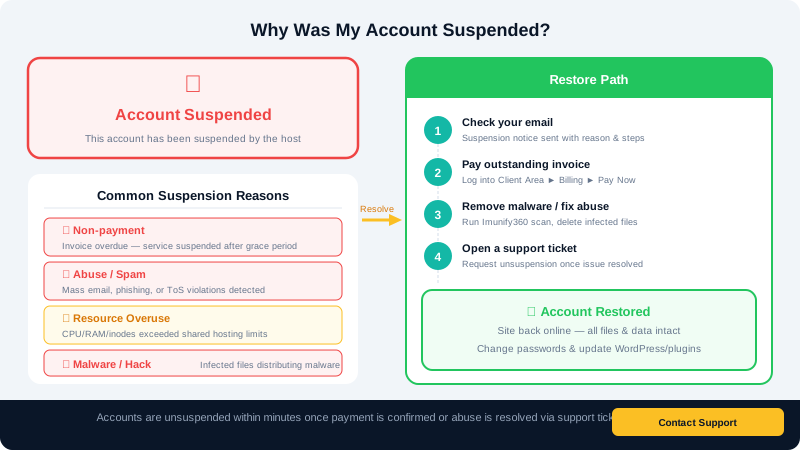
How to Find Out Why Your Account Was Suspended
- Log in to your Client Area at
clients.cyclebreezehost.com. - Go to Services > My Services and click your hosting package.
- The service detail page will show the current status. If the account is suspended, a reason is typically noted in the Notes field or in a recent email sent to your registered address.
- Check your email inbox (including spam) for a notification from info@cyclebreezehost.com.
If you cannot log in to the Client Area, the suspension may be account-wide due to an overdue invoice. In that case, contact support directly.
Common Reasons for Suspension
1. Overdue Invoice
The most common reason. When a hosting invoice passes its due date and automatic payment fails, the account is suspended after a grace period.
How to resolve it:
- Log in to your Client Area and go to Billing > My Invoices.
- Locate the overdue invoice (shown in red) and click Pay Now.
- Complete payment using your saved payment method or add a new one.
- Your account will typically be unsuspended automatically within a few minutes. If it is not, open a support ticket referencing your invoice number.
2. Malware or Compromised Files
Imunify360 continuously scans all hosting accounts. If active malware, a phishing page, or a spam-sending script is detected and cannot be automatically quarantined, the account may be suspended to prevent harm to other users and your visitors.
How to resolve it:
- Open a support ticket requesting details of the detected files.
- Clean or delete the infected files — our team can assist with this.
- Identify and close the entry point: update all WordPress plugins, themes, and core; change all passwords (cPanel, FTP, WordPress admin, database).
- Enable 2FA on cPanel and your WordPress admin account.
- Request unsuspension once the malware has been removed and confirmed clean.
3. Resource Abuse (Shared Hosting)
Shared hosting accounts have CPU, RAM, and entry process limits to ensure fair resource usage across the server. A runaway script, a poorly coded plugin, or a sudden traffic spike can push an account over these limits, triggering a temporary suspension.
How to resolve it:
- Identify the cause using the CPU and Concurrent Connection Usage tool in cPanel (under Metrics).
- Common culprits include: WP-Cron running excessively, a plugin generating database queries in a loop, or a contact form being hammered by bots.
- Deactivate the problematic plugin or script, then contact support to lift the suspension.
- If your site has grown beyond shared hosting limits, consider upgrading to a Cloud VPS plan for dedicated resources.
4. Terms of Service Violation
Accounts hosting content that violates CyclebreezeHost's Terms of Service — including spam distribution, illegal content, or copyright infringement — will be suspended. In serious cases, suspension may be immediate.
How to resolve it: Contact support at info@cyclebreezehost.com to understand the specific violation. Provide any clarifying context. If the violation was caused by a compromised account (a hacker used your site to send spam, for example), follow the malware clean-up steps above.
5. Abuse Complaint
If a third party files an abuse complaint about your domain or content (e.g., a DMCA takedown notice), the account may be suspended pending review.
How to resolve it:
- Respond to the support ticket with your account of the situation.
- If the complaint is valid, remove the infringing content.
- If the complaint is unfounded, provide evidence and request a review.
Preventing Future Suspensions
- Set up automatic payment or pay invoices early in your Client Area.
- Keep all software (WordPress, plugins, themes) updated at all times.
- Enable Imunify360 notifications so you are alerted before a suspension occurs.
- Review your site's resource usage periodically in cPanel Metrics.
Need Help?
Open a support ticket at clients.cyclebreezehost.com or email info@cyclebreezehost.com. Our team is available 24/7 and will work with you to restore your account as quickly as possible.